
Gallery
On an older or storage-tight Android phone, a gallery that stays strictly local — no cloud sync, a small footprint, photo categorization that runs on the device instead of a server — is exactly the right shape of tool, and this one commits to it. The trade-offs are real and better known in advance: there is no built-in backup, no month-by-month batch selection, no in-place album renaming, and per the FAQ deleting a file here removes it from device storage, which will prompt cloud backup apps to delete their synced copies.
- Owners of older, entry-level, or storage-tight Android phones who want a gallery that opens instantly and scrolls without stuttering — the most consistent piece of praise in published feedback comes from exactly these users
- People who mainly want to browse and tidy on-device media — camera folder, screenshots, downloads, and MicroSD — fully offline, with no background cellular data use, and who already have a backup approach handled elsewhere
- Anyone expecting their gallery to double as a safety net — there is no built-in cloud backup, so everything the app shows exists in one place only, and deletions here propagate to cloud copies that other apps keep in sync
- Photographers who shoot RAW or want real editing control — per the FAQ the app is optimized for JPEG, PNG, and MP4, and the editor stops at auto-enhance, crop, rotate, and basic filters, with no selective adjustments or color curves
- Users with large, messy libraries who organize in bulk — there is no month-by-month batch selection and albums cannot be renamed in place



Overview
Most photo apps want to be a service. This one wants to be a folder browser that happens to be clever about sorting, and that narrowness reads as the point rather than a shortfall. It reads the phone’s physical storage — camera folder, screenshots, downloads, whatever other apps leave behind — and shows what is there. No sync, no upload, no server-side library. If you have wanted a gallery that stays a gallery, this largely delivers — though one consequence of the design, how deletion behaves, is better learned from a review than from experience.
What it actually is: a local reader, not a cloud service
This app manages storage, not a library. Per its listing it indexes on-device directories directly, targeting where photos accumulate: /DCIM, screenshots, downloads, and third-party app folders.
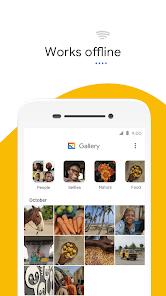
A reflexive review would file “no cloud backup” under missing features. It is not missing — it is the design, and nearly every strength here flows from it. The app works fully offline with no background cellular data use, which matters on a metered connection. And showing only what is physically present makes it good at surfacing junk — downloaded images, stray screenshots, app clutter — that a cloud-blended view buries.
The Android Go inheritance, and why the footprint matters
The app was historically developed as Gallery Go under Google’s Android Go initiative, and that lineage explains most of what it is. Android Go targeted entry-level phones with limited RAM and storage, where a gallery that stalls mid-scroll quietly becomes the app you avoid.
The listing describes an extremely low package size and minimal active RAM use — the developer’s characterization, not a measurement, since we did not profile anything. It is corroborated by the most consistent theme in published feedback: reviewers on older and budget hardware report that the app opens instantly and moves through files without stuttering. On a phone where most software runs uphill, that is the whole value proposition.
The on-device categorization, stated accurately
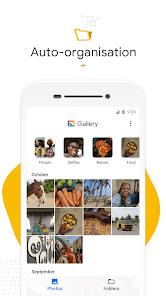
The organizing feature is a lightweight machine-learning model running on the phone’s own processor. Per the description and FAQ it processes new images in the background when the device is idle and charging — typically overnight — sorting them into People, Selfies, Nature, Animals, Documents, Videos, and Movies, without sending data to external servers.
The listing says this “ensures user privacy.” We attribute that framing to the listing rather than assert it ourselves, since we have audited nothing. The defensible observation is structural: categorization on the device requires no upload, a materially different arrangement from cloud tagging.
MicroSD support, handled as a first-class location
The app handles internal directories and physical MicroSD storage, letting you copy, move, and organize files across them. On budget hardware — precisely the audience it inherited — a card is often where most photos actually live, so being able to browse and move files across both storage locations without leaving the app is a quiet strength.
The deletion behavior you should understand before you start tidying
This is the most consequential item in this review, and it deserves stating plainly. Per the app’s own FAQ: because the app operates as a direct manager of your phone’s physical storage, deleting a file deletes it from the local drive, which will prompt cloud backup apps to delete their synced copies.
In practice this matters more than it sounds. If another app on the phone syncs your camera folder to a cloud library, removing a photo here does not just remove it from this app’s view — it removes the file from the device, and the syncing app propagates the removal. Someone opening this gallery to clear a few hundred screenshots may be doing rather more.
We want to be fair about what this is. It is not a bug and not a design failure; it is the predictable consequence of an app that manages physical files rather than maintaining its own library abstraction, and a storage manager that hid deletions from the rest of the system would arguably be worse. Google documents it in the FAQ. But documented is not the same as obvious, and this is the kind of thing users meet in the wrong order. If your camera folder is synced anywhere, treat a deletion here as a deletion everywhere.
Batch selection and album renaming: where the interface makes work
Two documented gaps account for most of the friction in published feedback, both about organizing rather than viewing.
The first is selection. There is no month-by-month batch selection, so clearing a large group means tapping through photos individually. Recurring feedback calls this tedious, and the reason is easy to see: the app’s strength — surfacing every screenshot, download, and stray image — creates the bulk cleanup job manual selection makes slow.
The second is album renaming. Per the FAQ the current version cannot rename an album in place: to change a folder’s name you create a new folder, move the images across, and delete the original. That is a multi-step workaround for a one-word edit, and it appears often enough in feedback to count as a real irritation. Note that it ends in a deletion, which loops back to the section above.
The editor is deliberately small, and there is a format ceiling
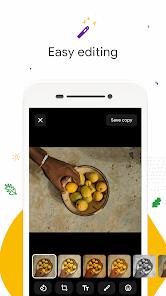
The editing tools are what a lightweight gallery would have and no more: a single-tap auto-enhance adjusting exposure, contrast, and color balance, plus crop, rotate, and basic filters. For straightening a photo before sending it, that is enough. For anything more considered it is not, and the documented gaps are specific: no selective adjustments, no color curves, no advanced cleanup tools.
There is also a firm format ceiling: per the FAQ the app does not support RAW, being optimized for JPEG, PNG, and MP4. If you shoot RAW, this app is not part of your workflow.
No backup means no safety net
The absence of built-in cloud backup is a documented con, though it follows from the design rather than an oversight. Everything this app shows exists in exactly one place: if the phone is lost, stolen, or damaged, the photos go with it.
The honest framing: this is a viewer and organizer, not a safety net, and it does not claim otherwise. It pairs with whatever backup approach you already have — but a fast, tidy gallery is not protection.
How it compares
The instructive comparison is not with another gallery app but between two shapes of photo software. A cloud service maintains a library that outlives the device; a local manager gives a fast, offline view of the files physically on it.
The FAQ makes the positioning explicit: this is not the app that comes preloaded on phones shipping with a cloud-integrated photo service — it is something users add on top, as a fast offline tool for on-device files. It is not a replacement for a cloud service but a different instrument, and plenty of people sensibly run both.
Reading the install count honestly
More than a billion installs sounds like a runaway hit, but for an app with this lineage the number needs care: an Android Go-derived app reaches that scale substantially through device preloading and the Go ecosystem rather than a billion deliberate individual choices. That is an observation about distribution, not a criticism.
The 4.2 rating across 588,688 ratings is the more informative figure — respectable, with enough volume to mean something. What appears to keep it from sitting higher, judging by the complaints that recur most in published feedback, is the organizing friction: the missing month-by-month selection and the album renaming workaround.
A note on recency
Not an abandoned Go-era relic: Google Play lists a May 27, 2026 update, 4 screenshots, and Google LLC as the developer — which matters for a utility whose value tracks Android’s storage permissions.
Who it’s not for
If you want your gallery to be your backup, this is not it. If you shoot RAW or want genuine editing control, the editor will frustrate you quickly. If you organize a large library in bulk, the missing month-by-month selection and the renaming workaround will cost more time than the app saves. And if you want photos in one place across phone, tablet, and laptop, this is the wrong shape of tool.
Our take
This is a focused app that knows what it is, and we rate it well for that. As a fast, offline, low-footprint local gallery — handling MicroSD properly, categorizing on the device rather than by upload, staying responsive where most software does not — it does its job cleanly, and the praise from users on older phones is its most credible signal. The reservations are equally concrete: the organizing tools lag the browsing experience, the editor is minimal, RAW is out, and the deletion behavior is worth understanding before a cleanup session. If you already have backup handled and want a quick local view of what is on your phone, this is a good pick.
How We Evaluate
We assess every app on the same checklist: what it actually delivers versus what it promises, how honest the pitch is, where real users hit friction, and who should look elsewhere. We did NOT hands-on test this app — we did not install it, index a photo library with it, organize or delete anything through it, or measure its footprint or performance ourselves. This assessment is grounded in the app's Google Play listing and description, its stated features (direct indexing of on-device physical directories, the on-device machine-learning categorization that runs when the device is idle and charging, MicroSD support, and the simplified editing tools), the pros and cons recorded in our database, the developer FAQ — which is the source for the deletion behavior, the album renaming limitation, the lack of RAW support, and the note that this app is not the default on phones that ship with a cloud-integrated photo service — the recurring themes in published user feedback, and the store signals: a 4.2 rating across 588,688 ratings and 1B+ installs, 4 screenshots, a May 27, 2026 Play update, and developer Google LLC. We also weigh the app's origin: it was historically developed as Gallery Go under Google's Android Go initiative for entry-level hardware, which explains both its design priorities and why its install count reflects device preloading and the Go ecosystem as much as individual choice. Descriptions of the package size and RAM use are the listing's own qualitative characterization, relayed as such rather than measured by us. Where we cite user sentiment, we are reflecting documented recurring feedback rather than personal sessions, and we do not attach star ratings to it.
Pros & Cons
The application runs completely offline, ensuring stable performance in areas with weak or expensive internet connections.
Built-in machine learning sorts photos locally on the device, ensuring user privacy and keeping metadata secure.
The app is designed with a tiny installation footprint, leaving more storage space available for the user's photos and videos.
Full support for external MicroSD cards allows users to easily copy, move, and organize files across storage partitions.
Displaying only on-device media makes it easy to find and delete large junk files, downloaded images, and temporary screenshots.
- ✕
The user interface lacks month-by-month batch selection options, meaning users must manually select large groups of photos individually.
- ✕
Custom folder management is limited, as the app does not allow renaming existing albums without deleting and recreating them.
- ✕
Without built-in cloud backup tools, users risk permanent data loss if their physical device is damaged or lost.
- ✕
The editing suite is highly simplified, lacking professional tools like selective adjustments, color curves, and advanced AI-powered cleanup features.
Download
 Get it on Google Play
  Get it on App Store
 FAQs
How does the app organize photos into categories like People and Nature if it works completely offline?
The application uses a built-in, lightweight machine learning model that runs directly on the phone's processor. This model processes new images overnight when the device is plugged in and idle, grouping them without sending any data to external servers.
Will deleting an image in this application also delete it from other photo services on my phone?
Yes. Because this application operates as a direct manager of your phone's physical storage, deleting a file deletes it from the local drive, which will prompt cloud backup apps to delete their synced copies.
Can I rename my custom photo albums directly within the interface?
No, the current version of the application does not support direct album renaming. Users must create a new folder with the desired name, move the images over, and delete the original folder.
Does the application support viewing and editing professional RAW photo files?
No, this application is optimized for standard consumer formats like JPEG, PNG, and MP4. It does not have the processing capabilities or metadata support required for heavy RAW files.
Is this application pre-installed on Google Pixel devices?
No, Google Pixel devices come with the cloud-integrated photo service by default. However, users can download this lightweight gallery app as a fast, offline tool to manage on-device files.
Hot Reviews
Users appreciate how the app focuses strictly on local files, making it easy to find on-device images without getting them mixed up with large cloud libraries.
Many reviewers find the selection tools frustrating, noting that the inability to select photos by month makes organizing large libraries highly tedious.
The lack of a simple album renaming option is a frequent complaint, as users must delete and recreate folders just to fix a name.
Reviewers with older or budget devices praise the app's performance, noting that it opens instantly and navigates files without any stuttering.