Mini Soccer Star


Overview
Mini Soccer Star, developed by Viva Games Studios, condenses the complex career of a professional soccer player into an accessible, touch-optimized gameplay loop. Distinguishing itself from conventional 11v11 real-time simulation games, Mini Soccer Star utilizes a turn-based tactical interaction mechanic. Whenever the user's customized player becomes involved in an active phase of play—such as taking a shot, making a key pass, or intercepting an attack—the game engine pauses temporal progression. This "time-freeze" state enables players to analyze field positioning, calculate passing lanes, and execute shots using intuitive swipe gestures.
The core depth of Mini Soccer Star lies in its gesture telemetry. The speed, trajectory, and curve of a player's finger drag across the display directly correlate to ball velocity, elevation, and Magnus-effect spin. Striking the center of the ball produces a direct, low-friction strike, while dragging along the outer perimeter imparts curling trajectories capable of bypassing defensive walls or rounding goalkeepers. Additionally, the title incorporates a dedicated Goalkeeper Mode, reversing the core interaction by placing the user in control of shot-stopping mechanics, relying on rapid swipe reaction times to intercept incoming shots.
Career Mode forms the primary retention driver in Mini Soccer Star. Players start as unknown prospects in lower-tier domestic leagues and must meet match objectives to earn experience, prestige, and contract offers from higher-tier clubs across major international leagues, including MLS, the Premier League, and La Liga. Between matches, players participate in skill-building training mini-games that permanently enhance physical attributes such as shot power, passing accuracy, and spin capacity.
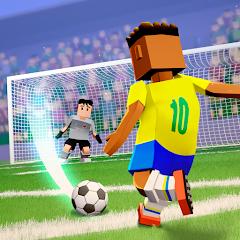
The application employs a stylized visual design. This art direction reduces GPU overhead, allowing smooth performance on entry-level Android hardware. By emphasizing strategic puzzle-like shot execution over complex manual player movement, Mini Soccer Star appeals to casual gamers seeking quick, engaging sports sessions.
Pros & Cons
Time-freeze mechanic enables precise swipe trajectory and curve planning during key match moments.
Full offline playability across career progression, goalkeeper modes, and training drills.
Inclusion of both outfield career progression and dedicated goalkeeper gameplay modes.
Optimized visual rendering engine ensures high frame rates across budget mobile hardware.
Extensive character customization includes boots, kits, hairstyles, and equipment.
Built-in video highlight feature allows instant recording and exporting of notable goals.
- ✕
Failed passes or shots immediately reset the current action sequence, disrupting match flow.
- ✕
Stylized visual direction lacks the photorealistic presentation of licensed console-style soccer franchises.
- ✕
Absence of direct real-time head-to-head online multiplayer limits competitive social interaction.
Download


FAQs
How does shot control work in Mini Soccer Star?
When your player receives the ball, match time pauses, allowing you to drag a line from the ball to set the direction, elevation, power, and spin of your shot or pass.
Can the career mode be played without an internet connection?
Yes, Mini Soccer Star is fully functional offline, preserving player career progress locally on the device.
Which official leagues and clubs are included in the game?
The game features club structures modeled after premier leagues in the USA, England, Spain, Germany, alongside national team tournaments.
What is Goalkeeper Mode and how is it accessed?
Goalkeeper Mode is a dedicated game option where players control the keeper, using quick swipe gestures to dive and block incoming AI shots.
How large is the app installation footprint?
The application is optimized to maintain a total installation size of under 150 MB, making it accessible for devices with limited storage.
Hot Reviews
The decision to freeze time during crucial passes and shots transforms complex soccer mechanics into rewarding tactical decisions. Mastering the arc of curl shots around defensive walls is deeply satisfying.
The game runs smoothly without dropping frames or overheating budget smartphones. The offline career mode offers deep progression without constant connectivity demands.
Failing a single pass in a complex multi-stage attack resets the entire scenario. This trial-and-error approach can become frustrating on higher difficulty levels.
Having access to player customization, training mini-games, and a full league system without requiring Wi-Fi makes this an ideal offline sports title.