trivago: Compare hotel prices
trivago is a free, straightforward way to see which booking site lists a hotel for the least, and its price-drop alerts reward travelers who plan ahead. Since early 2026, though, many searches need an account, and the final price, payment and any booking problems sit with the site you're sent to.
- Travelers who've picked a hotel and want to see which booking site lists it cheapest before paying
- Flexible planners happy to favorite a property and wait for a price-drop alert
- People comparing hostels, B&Bs and vacation rentals alongside hotels in a single search
- Anyone who wants quick, anonymous price checks; many searches now require signing in
- Travelers who want one company to handle search, payment and support from start to finish
- Budget hunters who rely on strict price filters; users report over-budget hotels still appearing
- Loyalty-program members who get more value by booking directly with one chain or booking site




Overview
trivago is still one of the simplest ways to answer a common travel question — which website has the lowest price for this hotel, on these dates — and for that job it earns its 4.4 rating across more than 344,000 Play Store ratings. The key thing to know is that trivago doesn’t sell rooms. It finds the offers, then hands you to Booking.com, Expedia, Hotels.com or another site to pay, and everything after that handoff belongs to the other company. Add the early-2026 shift to a sign-in requirement for many searches, and the app now suits planners who’ll use its alerts and comparison tools more than people who want a fast, anonymous price check.
How the price comparison works
trivago is a metasearch engine: a search layer over other booking sites, not a travel agency. You search a destination and dates, and the app gathers offers for each property from hundreds of booking sites, then lines them up side by side so you can see the spread for the same stay. trivago says it covers more than 5 million properties in 190 countries, and the listings go beyond hotels to hostels, bed and breakfasts, vacation rentals and boutique stays.
When you tap an offer, you leave trivago. The booking, the payment, the confirmation number and any customer service all come from the site you land on. That’s simply how metasearch works, but we’d call it the single most important thing to understand before installing, because it explains most of the complaints about the app.
The other distinctive piece is the trivago Rating Index. Instead of showing one site’s guest score, trivago combines reviews from several booking platforms into a single number. The logic is sound: one site’s ratings can skew high or low depending on who books there, and a blended score evens that out. It’s a useful first filter in an unfamiliar city, though for anything specific, such as noise or parking, the written reviews on the booking site still matter.
How trivago makes money
There’s no paywall, subscription or in-app purchase. The booking sites pay trivago instead: it earns a fee each time you click through to one of their offers. That keeps the app free for travelers, and it’s also a good reason to treat the results as a list to read rather than a single answer.
Two habits get the most out of it. First, open the full list of offers for a property instead of tapping only the top one. Seeing the spread across sites is the whole point of the app, and offers for the same hotel can differ in room type, breakfast or cancellation terms, so the lowest headline number isn’t always the best deal for your stay. Second, check the total, taxes and fees included, on the booking site before you pay. That final figure is the one that counts, whichever site you end up on.
The Mobile Rate badge is trivago’s other pricing pitch. The app’s store listing puts these app-only discounts at often 10–20% below what you’d see in a desktop browser. The real saving varies by property and date, but when two offers are close, a Mobile Rate is worth checking first.
Walking through the app
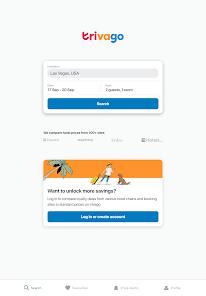
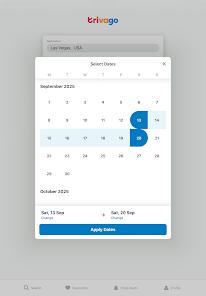
The core flow is search, filter, compare. Filters go deeper than price: you can narrow results by specific amenities such as pet-friendly rooms or late check-out, which helps when one requirement rules out half a city. Results can also be browsed on a map, with a price shown for each property.
Once you have a shortlist, Favorites and the Compare tool do the heavy lifting. Saved properties can be laid out in a single grid of amenities and prices, so you can weigh what each stay actually includes rather than chasing the cheapest rate alone. For a trip with a fixed list of needs, this is the most practical part of the app.
Favorites also power the feature regular users praise most: Price Drop Alerts. Favorite a hotel and trivago notifies you when its price falls. For trips booked weeks or months out, this is the app at its best, because it turns a one-off search into something that keeps working while you wait.
All of this now sits behind an account. By early 2026, many search features required signing in, where trivago once let you browse anonymously. The account is what ties personalized deals, alerts and Favorites to you, and for people who use those features, it’s a reasonable ask. For anyone who opens the app to check one price and leave, it adds a step that changes what the app is good for.
What travelers report
Three themes dominate recent feedback, and they pull in different directions.
The loudest is the login requirement. Many users who relied on trivago for quick comparisons say the sign-in step removed the main reason they installed it, and some report uninstalling. The debate has a privacy side too: some travelers would rather not tie their hotel searches to an account at all.
The most praised feature is Price Drop Alerts. Frequent travelers describe favoriting a property, waiting, and booking after a drop, with some saying the wait saved them more than 30%. Results like that depend on flexible timing, but the alerts clearly deliver for patient planners.
The most common technical complaint concerns price filters. Users report setting a nightly cap and still seeing the map fill with hotels well above it, which undercuts the point of filtering when you’re working to a budget.
Where it frustrates
The price you tap isn’t always the price you get. The most consequential issue is price mismatch: a “best price” shown in the app changes or disappears once you land on the booking site. Prices move constantly and trivago relays data from hundreds of sources, so some lag is understandable, but it means the figure in the app is a pointer, not a quote.
Problems after booking go to someone else. If a booking fails, you’re charged twice, or the hotel can’t find the reservation number you were given, trivago can’t resolve it; you contact the site that took your payment. It’s the normal metasearch arrangement, but it’s easy to forget when the whole search happened in trivago’s app, and it can mean extra calls if something goes wrong at check-in.
Filters need a second look. Given the price-filter reports, scan results rather than assuming everything shown fits your budget.
Who it’s not for
If you want a quick, anonymous price check, trivago is a weaker fit than it used to be, since many searches now ask you to sign in. If you’d rather have one company responsible for the whole trip, booking directly with a single travel site or the hotel itself keeps the chain of responsibility short. And if you collect points with a hotel chain or a booking site’s loyalty program, the cheapest offer on trivago may not beat the value of booking where your status counts.
How it compares
Google Hotels does the same core job, comparing rates from many booking sites, inside Google Search and Maps, with no separate app to install and no new account to create for a basic search. For one-off price checks, it’s now the lower-friction option. trivago’s case rests on its hotel-focused tools, chiefly the Compare grid for weighing amenities side by side and the blended Rating Index.
Kayak is another long-established metasearch name and covers flights and rental cars alongside hotels, which suits travelers planning a whole trip in one place. trivago stays focused on where you’ll sleep.
Booking.com or Expedia directly flips the trade-off. You lose the cross-site comparison, but one company handles search, payment and support, and you can earn through its loyalty program. A sensible middle path is to use trivago to find where a hotel is cheapest, then book on that site, or on the hotel’s own site, knowing exactly who you’re dealing with.
A note on recency
The biggest recent change is the account requirement. By early 2026, trivago had moved toward an account-centered model, and that shift still dominates feedback. Older guides and reviews describing a quick, no-login search no longer match how the app works, so expect to sign in before many searches.
The verdict
trivago remains a strong, free tool for one specific job: showing which booking site lists a hotel for the least, with a blended rating and a side-by-side grid to help you judge value. Its price-drop alerts are a good reason to keep it installed if you book trips ahead. Go in knowing three things: you’ll likely need an account, the price in the app is a pointer rather than a guarantee, and once you tap through, the booking and any problems belong to the site you land on. Used as the comparison step before you book, it does that job well.
How We Evaluate
This review draws on trivago's Play Store listing and its 4.4-star rating across more than 344,000 ratings, the app's feature descriptions, recurring themes in Google Play reviews and community discussions through 2026, and trivago's public record as a hotel metasearch company, including how it earns referral fees from booking sites. Coverage figures and Mobile Rate savings are the app's own claims and are presented that way. We didn't complete bookings through the app, so price accuracy on the hand-off is judged from user reports.
Pros & Cons
Aggregates millions of deals from hundreds of booking sites, providing the most comprehensive "one-stop" price comparison in the travel industry.
The "trivago Rating Index" provides a more balanced and truthful guest rating by combining data from multiple platforms.
"Mobile Exclusive Rates" offer significant savings for smartphone users that are frequently unavailable on legacy desktop websites.
High-efficiency filtering tools allow users to narrow down properties by very specific amenities, such as "pet-friendly" or "late check-out".
The "Price Drop Alert" system allows users to "favorite" a hotel and receive notifications exactly when the price decreases.
The side-by-side comparison tool for amenities ensures that users are choosing the best value, not just the lowest price.
Broad property coverage includes not only hotels but also hostels, bed and breakfasts, vacation rentals, and boutique stays.
- ✕
Mandatory account creation for basic searches has significantly degraded the user experience for those seeking quick, anonymous comparisons.
- ✕
The platform is prone to technical desynchronization where the "best price" advertised on the map disappears upon redirection to the booking site.
- ✕
In the event of a booking failure or double-charging, users must resolve the issue with the third-party OTA, as trivago lacks direct control over the transaction.
Download
 Get it on Google Play
 Get it on App Store
FAQs
Does trivago sell the hotel bookings directly?
No, trivago is a metasearch engine. When you find a deal, it redirects you to a third-party booking site like Expedia or Booking.com to finalize the transaction.
How do I find a "Mobile Rate" discount?
Look for hotels with a specific "Mobile Rate" badge during your search; these are exclusive discounts available only on the trivago app.
Why do I need to create an account to search?
Trivago uses account data to personalize deals and enable the "Price Drop Alert" and "Favorites" features, though some users find this requirement intrusive.
What should I do if my hotel doesn't recognize my booking?
You must contact the customer support of the specific booking site (the one you paid) as they are the ones who issued the reservation, not trivago.
Can I compare hotels side-by-side?
Yes, you can save your favorite properties and use the "Compare" tool to see their amenities and prices in a single grid.
Hot Reviews
Summarized from Google Play reviews and community discussions.
Many users from early 2026 are deleting the app because they can no longer "just search" without a mandatory login, leading to claims that the app has become a "waste of time".
On the positive side, regular travelers praise the "Price Drop" notifications, noting that it helped them save over 30% by waiting for the right moment to book.
A common technical complaint is that the price filters (e.g., "limit to $100/night") often fail, populating the map with expensive hotels that the user explicitly tried to filter out.