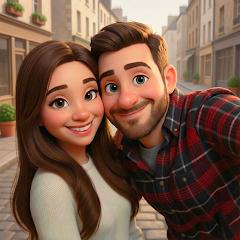
ToonMe photo cartoon maker
ToonMe is one of the quickest ways to turn a selfie into a cartoon portrait that still clearly looks like you, and its 3D-animated styles are the standout. The free tier carries frequent full-screen ads, watermarks and lower-resolution exports, so anyone who wants clean, shareable results should expect to weigh the PRO subscription.
- Social media users who want a distinctive cartoon or 3D-animated profile picture that still clearly looks like them
- Casual creators making stylized avatars, framed portraits and GIFs for chats, posts and one-off fun edits
- People happy to pay a subscription in exchange for ad-free, watermark-free, high-resolution exports
- Anyone who needs offline editing, since every style is rendered on remote servers and needs a steady internet connection
- Users who want cartoon effects on live camera or video clips; ToonMe works on still photos
- People who prefer not to upload face photos to cloud servers for processing
- Free-tier users who expect clean, full-resolution exports without watermarks or frequent ads


Overview
If what you want is a cartoon version of yourself that friends will recognize at a glance, ToonMe is still one of the quickest and most convincing ways to get it. Its strength is likeness: the 3D-animated and vector styles redraw your face in a new idiom without flattening it into a generic character, and results come back within seconds. The trade-off is the free experience. Full-screen ads and upgrade prompts sit between generation steps, and the clean, high-resolution, watermark-free version of each image is reserved for the PRO subscription. Go in expecting either to tolerate that or to pay for it.
ToonMe is published by PHOTO LAB DMCC, the developer behind the Photo Lab picture editor, and it has the scale to show for it: more than 100 million downloads and over 1.8 million Play Store ratings, averaging 4.5. That rating fits a product that does its central job well: most of the frustration in user feedback is about monetization and connectivity, not the quality of the portraits themselves. It is a focused tool, though — a portrait stylizer and avatar maker, not a general photo editor or a video filter app — and it suits people who know that is what they want.
What ToonMe gets right
The headline feature is how well it keeps you looking like you. Rather than laying a color filter or an edge-detection effect over the photo, ToonMe maps the structure of the face — eye contours, nose shape, lip curve, jawline — and then redraws it in the chosen style, re-rendering skin texture, lighting and highlights around that framework. That is why its 3D-animated looks draw so much praise: the output reads as a character from an animated film who happens to be you, rather than a stranger with your hair color.
The style catalog is broad. Alongside the 3D animated-studio looks, there are 2D vector-art styles, hand-drawn comic illustrations and traditional oil-painting treatments, and the app keeps adding new filters, trending templates and seasonal presets. That rotation matters, because much of its use is social: a new style is a reason to post a new profile picture.
It also goes beyond headshots. Dedicated full-body models stylize posture and clothing along with the face, which makes ToonMe more useful for character-style images than apps that only handle a cropped selfie. And because a segmentation model separates the subject from the background — tracing hair, skin and clothing edges — background swaps are designed to look clean rather than cut-and-pasted.
How a transformation works
The flow is short. You grant camera and storage access, pick a photo from your gallery or take a new one, and choose a style. The image is then sent to ToonMe’s servers, where the heavy neural processing runs on remote GPUs, and the finished portrait comes back to your phone, typically within seconds. That cloud design keeps the app itself small — under 40 MB — and means the heavy lifting does not depend on your phone’s processing power.
Once a portrait is rendered, there is a layer of editing on top: selective filtering, custom text overlays, background replacement, digital frames and animated GIF generation. Users often single out the combination of automatic background removal, artistic presets and frames as the reason ToonMe works so well for profile pictures — you can go from a casual selfie to a finished, framed avatar without opening a second app.
Because the face-mapping step underpins every style, the photo you feed in matters. A clear, well-lit portrait gives the models the most facial detail to work with, so it is worth trying a couple of source images before deciding that a style does not suit you.
The free tier and what PRO changes
This is where expectations need setting. ToonMe is free to download and you can generate portraits without paying, but the free experience is heavily ad-supported. A recurring complaint in user reviews is the frequency of full-screen ads and subscription prompts between generation steps, which can make it slow to work through several styles in one sitting.
The bigger practical limit is output. On the free tier, exports carry a watermark, high-resolution versions are restricted and some premium styles are locked. The PRO subscription removes the ads and the watermark, unlocks the premium styles and enables high-resolution exports. For someone who wants a single fun picture for a group chat, the free tier may be enough. For anyone who wants a clean image to use as a long-term profile picture or to print, PRO is effectively the intended path.
We would suggest using the free tier first to see which styles flatter your face, then deciding on PRO once you know you will come back. Check the current subscription price and renewal terms in the Play Store before you confirm, and remember that subscriptions are cancelled through Google Play, not by uninstalling the app.
What users consistently report
The praise centers on likeness and speed: reviewers repeatedly describe how recognizable they remain in the 3D-animated and vector-art styles, and how quickly results arrive. ToonMe is also a go-to for refreshing a profile picture.
The criticism falls into two clear groups. The first is the ad load and upgrade prompts on the free tier, covered above. The second is dependence on the servers: processing speed, and sometimes whether a result comes back at all, depends on your connection and on how quickly the remote servers respond. On a weak mobile signal, or when the servers are slow to respond, the “within seconds” promise can stretch noticeably.
Where it falls short
Beyond the monetization, three limits are worth knowing before you install.
It needs a connection for everything. There is no offline mode, so ToonMe will not render anything on a flight or in a dead zone.
It works on still images. The pipeline handles photos, plus animated GIFs built from them, but it does not stylize live camera feeds or video clips. If you want to appear as a cartoon on video, a real-time lens in a social camera app is the better fit.
Your face photos leave the device. That is how the cloud architecture works, and it is common to apps in this category, but it deserves a moment’s thought. If you are careful about where portrait photos go, read the privacy policy before uploading — especially for photos of other people or children.
Who should look elsewhere
ToonMe is not the right pick if you need offline editing, video stylization, or a general-purpose photo editor. It is also not a good match for anyone who wants clean, high-resolution exports but has firmly ruled out a subscription — the free tier works as a preview of the full product rather than a complete version of it. And if uploading your face to a remote server is a dealbreaker, a cloud-based stylizer will not suit you.
How it compares to alternatives
Photo Lab, from the same developer, is the broader sibling: a general effects editor with a wide range of frames, montages and artistic filters. If you want many different effects rather than a focused cartoon portrait, it covers more ground; if you want the cartoon look specifically, ToonMe is the more direct route.
Lensa is best known for AI avatar packs generated from a set of selfies. It suits people who want a batch of varied portraits in one go, while ToonMe is built around turning one photo into one stylized image.
Real-time lenses in social camera apps such as Snapchat offer cartoon-style effects live, including on video, at no cost. They are the better fit for in-the-moment fun; ToonMe aims for a more finished, fully redrawn portrait that you can export and reuse anywhere.
General-purpose AI image assistants can now restyle an uploaded photo from a text prompt, which offers more creative freedom. The trade-off is predictability: ToonMe’s presets are built specifically to preserve facial likeness, so you get a consistent look without writing prompts.
How current it is
The Play listing was last updated on April 7, 2026, and the developer continues to add new filters, trending templates and seasonal presets. With more than 100 million downloads, ToonMe is an established name in the category rather than a short-lived trend. The issues users raise — ads, paywalled export quality and connectivity — follow from how the app is built and monetized, so expect them to remain part of the experience.
The verdict
ToonMe does one thing — turning a photo of you into a stylized portrait — and does it well, with likeness retention as its clearest advantage. The free-tier ad load and PRO-only clean exports are real costs, and you need a decent connection every time. For anyone who wants a recognizable cartoon avatar and is comfortable either sitting through ads or paying for the subscription, it is an easy recommendation. Try the free version first, find the styles that suit you, and decide on PRO with that knowledge rather than at the first upgrade prompt.
How We Evaluate
This review draws on ToonMe's Google Play listing, screenshots and store description, its 4.5 rating across roughly 1.8 million ratings and 100M+ downloads, and recurring themes in user reviews and community discussions. We weighed likeness and style range, the free-versus-PRO split, connectivity complaints and how the app compares with Photo Lab, Lensa, real-time camera lenses and general AI image tools. Subscription prices vary by region and change over time, so we describe what PRO includes rather than quoting a price.
Pros & Cons
Extensive catalog of neural style models covering 3D animated studio looks, 2D vector art, and comic illustrations.
Dense facial mesh tracking preserves recognizable subject likeness and proportions during radical style transfers.
Precise semantic segmentation isolates subject boundaries for clean background replacement and compositing.
Supports full-body character stylization in addition to standard close-up facial portraits.
Cloud GPU architecture offloads heavy computational workloads, maintaining a lightweight local app size under 40 MB.
Continuous model updates deliver fresh artistic filters, trending templates, and seasonal styling presets.
- ✕
Cloud-based neural processing requires a persistent high-speed internet connection for all rendering tasks.
- ✕
Free tier is burdened with aggressive advertising frequency and frequent upgrade prompts.
- ✕
High-resolution unwatermarked image exports are restricted to the paid PRO subscription tier.
- ✕
Pipeline focuses exclusively on static imagery and does not support real-time video stylization.
Download
 Get it on Google Play
 Get it on App Store
FAQs
How does ToonMe maintain facial likeness during artistic cartoonization?
The app uses neural network models trained on facial landmark datasets. It maps underlying facial geometry—such as eye spacing, jawline shape, and facial proportions—and applies artistic style transformations over that structural framework.
Can the application process image stylizations offline?
No. Because neural style synthesis runs on remote cloud GPU servers to minimize local device resource use, an active internet connection is required for image processing.
What specific benefits are included with the ToonMe PRO subscription?
The PRO subscription removes commercial advertisements, unlocks premium artistic styles, removes watermarks, and allows high-resolution image exports.
Does the app support full-body photos or only facial headshots?
Yes. The platform includes specialized full-body transformation models that stylize overall posture and clothing alongside facial features.
What permissions are required for the application to function?
The application requires standard storage and camera permissions to import and capture source portraits, along with network access to communicate with cloud rendering servers.
Hot Reviews
Summarized from Google Play reviews and community discussions.
Users praise the app's ability to maintain recognizable facial likeness while applying distinct 3D animation and vector art aesthetics within seconds.
The combination of automatic background removal, artistic presets, and digital frame effects makes the app a popular tool for designing social media profile pictures.
Multiple reviews criticize the frequency of full-screen advertisements and subscription prompts encountered between image generation steps on the free tier.
Users note that processing speeds and output availability depend heavily on internet connectivity and remote server response times.