Tasker
Overview
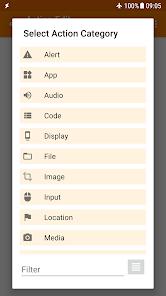
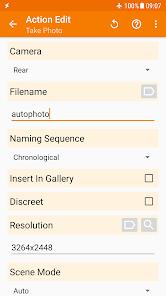
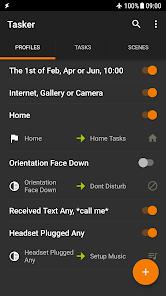
Tasker is widely regarded as the most powerful automation engine available on the Android platform. Originally developed by Crafty Apps and now maintained by Joao Dias (joaomgcd), Tasker is not merely an app but a "programmable environment" that allows users to create triggers (Contexts) and actions (Tasks) to control every aspect of their device. With over 350 built-in actions and 130+ trigger states, Tasker can automate everything from system-level settings like Dark Mode and Always On Display to complex web API interactions and hardware remapping.
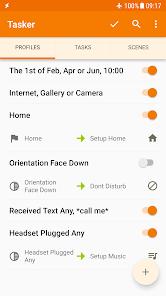
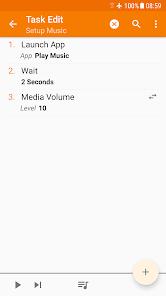
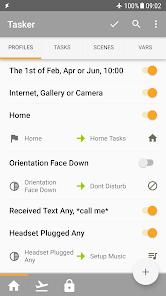
The architectural brilliance of Tasker lies in its modularity. A "Profile" in Tasker consists of a Context (the "When") and a Task (the "Do"). For instance, a user can set a Context of "Connected to Home Wi-Fi" to trigger a Task that "Turns off Mobile Data, sets volume to 50%, and reads out new SMS messages". This flexibility allows for the creation of "Smart" behaviors that phone manufacturers do not provide by default. Advanced users can utilize the "Tasker App Factory" to export their creations as standalone APKs, effectively allowing them to develop and distribute their own mini-applications.
One of the most insightful aspects of Tasker is its integration with the broader Android ecosystem through plugins. The "AutoApps" suite, for example, extends Tasker's reach into UI injection (AutoInput), specialized notifications (AutoNotification), and even IoT control via Web APIs. While the app does not require root access for the majority of its functions, it can leverage root or ADB "Secure Settings" permissions to perform deep system changes that Google's standard API restricts.
Despite its power, Tasker has a notoriously steep learning curve. The interface is utilitarian rather than "friendly," and mastering it requires a basic understanding of logic and variables. However, the developer is legendary for his responsiveness; it is common for users to receive a direct fix within hours of reporting a bug. As Android's security model becomes more restrictive with each version, Tasker continues to adapt, providing workarounds like Shizuku integration to maintain its status as the "Swiss Army Knife" of Android.
Pros & Cons
Tasker provides a level of control over the Android OS that is unmatched by any other non-root application, allowing for the automation of over 350 distinct actions.
The developer is exceptionally active and responsive, frequently updating the app to support the latest Android features and providing rapid support for technical issues.
A massive ecosystem of third-party plugins (e.g., AutoInput, AutoVoice) allows the app to interact with almost any other application or web service.
The "Tasker App Factory" allows users to monetize or share their automation logic by converting their Tasker projects into independent, standalone Android applications.
Sophisticated backup and sync capabilities ensure that users can automate the protection of their data to Google Drive or local storage.
The application supports a wide range of manual triggers, including hardware button long-presses, quick setting tiles, and custom navigation bar buttons.
- ✕
The learning curve is significant, and the interface can be overwhelming for casual users who are not familiar with programming logic or system-level Android mechanics.
- ✕
To unlock the full potential of certain automations, users often need to purchase additional third-party plugins, which can increase the total cost of ownership.
- ✕
Setting up some of the most powerful features requires advanced knowledge of ADB (Android Debug Bridge) or root access, which may be a barrier for non-technical users.
Download
 Get it on Google Play
  Get it on App Store
 FAQs
Do I need to root my phone to use Tasker?
No, most features work without root, although some "Secure Settings" require a one-time setup via ADB on a PC.
What is the Tasker App Factory?
It is an extension that allows you to bundle your Tasker profiles into a standalone APK that can be installed on devices that do not have Tasker.
Can Tasker control my smart home devices?
Yes, by using HTTP Request actions or plugins like AutoWeb, Tasker can communicate with almost any smart home API.
Is Tasker a one-time purchase?
Yes, Tasker typically requires a one-time payment to unlock the full version after a 7-day trial period.
Does Tasker drain the battery?
Tasker is highly optimized; however, poorly designed profiles (like constant high-frequency location checks) can impact battery life.
Can I automate WhatsApp messages with Tasker?
Yes, especially when paired with the AutoWeb or AutoInput plugins, Tasker can read and respond to messages across various platforms.
Hot Reviews
Long-term users consistently rate Tasker as an essential tool, with many having used it for over a decade. The ability to "fix" inherent phone annoyances is cited as its greatest value.
The responsiveness of the developer (Joao) is a recurring highlight in reviews. Users are often amazed to receive personalized technical assistance within hours of an inquiry.
While some users find the app "impossible" to learn initially, those who persist describe it as "worth every penny" for the sheer power it grants the user over their hardware.