
VLC for Android
Overview
VLC for Android is the mobile extension of the legendary open-source media player. Developed by the VideoLAN non-profit, the app has achieved a near-ubiquitous status due to its ability to play virtually any file format or codec without requiring additional downloads. Unlike many proprietary players on the Play Store that are riddled with ads or data-collecting trackers, VLC remains entirely free, open-source, and privacy-centric.
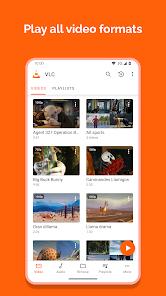
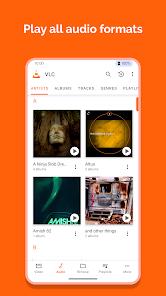
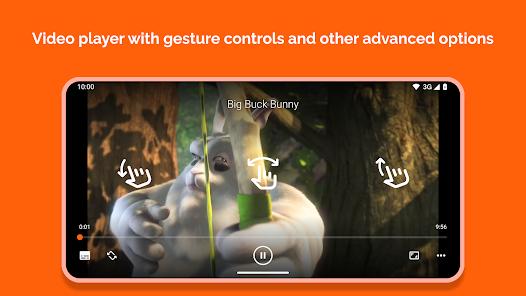
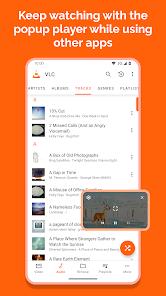
Technically, VLC is a powerhouse. It supports an exhaustive list of video and audio formats, including MKV, MP4, AVI, MOV, Ogg, FLAC, TS, and AAC, while also offering support for DVD ISOs and adaptive streaming. Insightfully, VLC functions as more than just a player; it is a full media library that automatically scans the device and organizes files with metadata and cover art. For advanced users, it offers features such as multi-track audio selection, full support for SSA subtitles, aspect-ratio adjustments, and gesture-based controls for brightness, volume, and seeking.
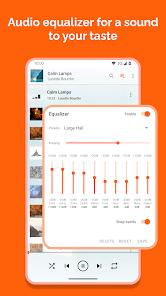
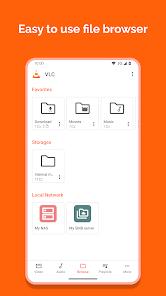
One of the most valuable aspects of VLC for Android is its network capabilities. It can stream media directly from local network shares (SMB, FTP, SFTP, NFS), UPnP/DLNA servers, and cloud platforms like Google Drive or Dropbox. The software is optimized for modern hardware, utilizing hardware acceleration for smooth 4K and 8K playback, and it includes a 10-band equalizer for precision audio tuning. As a community-driven project, VLC represents the peak of collaborative software development, offering a professional-grade media experience to any Android user at zero cost.
Pros & Cons
Universal Format Compatibility: Plays almost any video or audio file natively without needing extra codecs.
Completely Free and Ad-Free: Offers a premier media experience with no tracking, commercials, or in-app purchases.
Powerful Network Streaming: Supports a wide array of network protocols for streaming from home servers or the web.
Robust Subtitle Support: Includes full compatibility for advanced subtitle formats like SSA and a built-in subtitle downloader.
Privacy-Focused Design: No spying, no user tracking, and minimal permission requirements for basic playback.
Hardware-Accelerated Playback: Optimized to leverage modern chipsets for lag-free 4K/8K and HDR video.
- ✕
Steep Learning Curve: The depth of advanced settings can be overwhelming for casual users who just want a simple player.
- ✕
Inconsistent Cloud Integration: Accessing files via Google Drive or OneDrive can sometimes be less smooth than local playback.
- ✕
Playlist Management Bugs: Some users report that the app occasionally "forgets" media locations or loses custom-made playlists.
Download
 Get it on Google Play
  Get it on App Store
 FAQs
How do I download subtitles for my movie?
While playing a video, tap the subtitle icon, select "Download Subtitles," and VLC will search the web for the appropriate file based on the movie's metadata.
Can I use VLC as a music player?
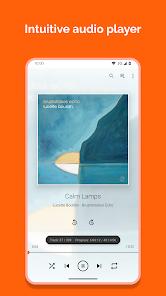
Yes, VLC has a dedicated audio section with a full media library, playlist support, and a 10-band equalizer for high-fidelity audio.
Does it support Chromecast?
Yes, VLC for Android allows you to "cast" any local or network file to a Chromecast-compatible device on the same Wi-Fi network.
Is VLC safe to use on my phone?
VLC is one of the safest apps available. It is open-source, developed by a non-profit, and contains no advertisements, trackers, or hidden code.
How do I access files on my computer?
Go to the "Browse" tab in VLC and select "Local Network." You can then connect to your computer via SMB, FTP, or other shared protocols to stream files directly.
Hot Reviews
Users consistently refer to VLC as the only media player they ever need, praising its reliability and its ability to play "corrupt" or non-standard files that other players fail to open.
Reviewers frequently contrast VLC with other "free" players on the Play Store, noting that the absence of intrusive ads makes the user experience significantly better.
Some users find the folder-based navigation system a bit difficult to manage when dealing with thousands of files, expressing a desire for more robust sorting options.