
Chess
One of Google Play's longest-running chess apps, and still one of its best offline trainers: AI Factory's human-like 'Treebeard' engine gives beginners a natural opponent instead of a robotic one, and the built-in Chess Tutor teaches as you play. The honest trade-offs are a free version carrying banner and between-match ads and a look that trails modern 3D rivals — paying for Chess Pro clears the ads.
- Beginners and improvers who want a genuinely strong offline opponent that plays naturally rather than robotically — the Treebeard engine makes human-like positional moves and weakens intelligently across 12 levels, so every level gives a rewarding game
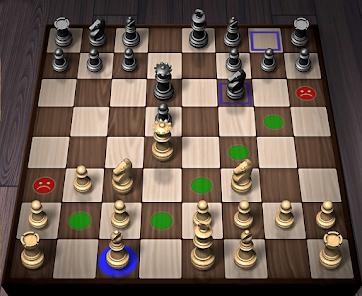
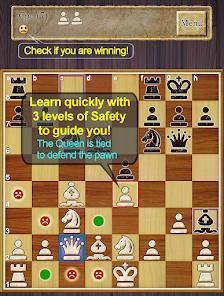
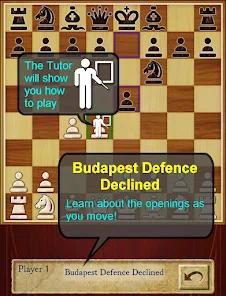
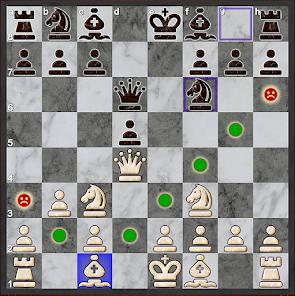
- Learners who want coaching built in — the optional Chess Tutor flags unsafe squares and pinned pieces, explains the opening being played, and recommends moves with an analytical breakdown
- Anyone who wants to practice without a connection or an account, with ELO tracking, fully free Chess960, local hot-seat play, and PGN export to save and analyze their games
- Players whose main interest is online multiplayer, live ranked ladders, big puzzle libraries, or a social chess community — this is an offline single-player tool by design
- Anyone who wants a modern, glossy 3D presentation; the interface is clean and functional but plainly dated next to newer titles
- Free users with low tolerance for banner and interstitial ads — they should weigh the paid Chess Pro, which removes them
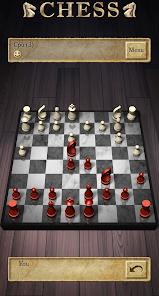
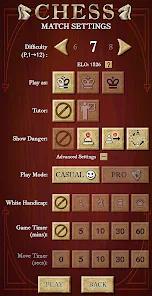
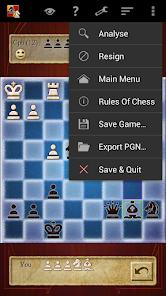
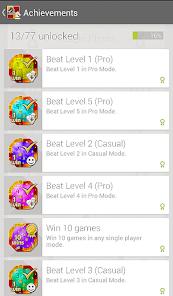


Overview
The pitch, and why it stands out
Most chess apps in 2026 sell you a community: online ladders, live opponents, puzzle streaks, a social feed. AI Factory’s Chess sells you something rarer and, for a lot of players, more useful — a genuinely strong opponent that lives entirely on your phone and plays like a human being. That offline-first identity is the whole point, and we think it’s a real strength rather than a limitation. Underneath sits the “Treebeard” engine, a long-running piece of software that also powered Microsoft’s MSN Chess, tuned to make natural, positional choices instead of the brute-force calculation that can feel robotic at lower levels. We didn’t test it on a device, but the store material, the 50M+ install base, and years of user reviews point to the same conclusion: this is one of the most respected practice-and-learning chess tools on Google Play.
An engine that plays like a person
The differentiator is the engine, and it’s worth understanding why. Most commercial chess apps lean on brute-force engines — Stockfish is the famous example — that calculate their way to the best move and then, at lower difficulty settings, get artificially dumbed down in ways that can produce strange, unnatural blunders. Treebeard takes a different route: it plays in a heuristic, human-like style that favors natural positional moves, and AI Factory built the app around it. The practical payoff shows up most at the levels beginners actually use. This is the point users return to most often. Recurring feedback describes the engine as feeling “like playing a real person,” and praises it for avoiding the erratic, unnatural blunders that basic engines make when weakened — which is exactly what you want if you’re trying to learn from your games rather than exploit a bot’s glitches.
Difficulty that actually scales
Chess ships 12 distinct levels of play, and the weakening between them is the intelligent kind. Rather than simply blundering on a timer, lower levels play a genuinely gentler but still coherent game, so a beginner gets a rewarding contest and a stronger player can dial the challenge up to something demanding. The app also tracks an ELO rating calculated from your performance against the CPU in its Pro Mode, so you can match the difficulty to a precise skill level and watch that number move over time. For self-directed practice — the core use case here — that combination of fine-grained difficulty and a running skill estimate is more useful than a ladder full of strangers, because it’s calibrated to you.
The Chess Tutor: coaching built in
The teaching layer is the Chess Tutor, an optional real-time coach, and it’s the feature that turns a strong opponent into an actual learning tool. Switched on, it highlights unsafe squares, identifies pinned pieces, explains the opening lines being played — the description names the Queen’s Gambit as an example — and recommends the optimal move with an analytical breakdown of why. Because it’s optional, stronger players can turn it off and play clean, while beginners can leave it on and effectively get a running commentary on their own game. Users single this out as one of the app’s best qualities, describing it as an excellent instructional tool precisely because it explains the board and warns about unsafe squares rather than just flashing the engine’s top move. That distinction — understanding versus being told — is the gap between a hint button and real coaching.
Chess960, hot-seat, and PGN export
Beyond the single-player core, the feature set is deeper than the modest presentation suggests. Chess960 — Fischer Random, where the back-rank pieces are shuffled into one of 960 starting layouts to neutralize opening-theory memorization — is fully supported and, per the FAQ, completely free. Local hot-seat play lets two people share the device for an over-the-board game without a network. And for anyone who wants to study their games afterward, full PGN export saves matches in the standard format so you can open them in any analysis tool. Detailed stat tracking rounds out the package. None of this depends on a connection, which is the recurring theme: the app is built to do its most useful work offline, and by every account it does.
The ad reality, stated plainly
Here’s the honest accounting. The free version — the one simply called “Chess” — is ad-supported, and the ads are the most-cited drawback in user reviews. Expect a persistent banner during play and full-screen interstitials between matches. That’s the trade for a free, full-featured app, but it’s a real one: recurring feedback notes that the animated top banner can distract mid-game and, on older devices, introduce minor lag. If that bothers you, the fix is straightforward — AI Factory sells a paid “Chess Pro” version that removes the ads. (The odd naming, for the curious, is a Google Play policy matter: the store restricts pricing words like “free” in titles, so the old “Chess Free” became simply “Chess,” with “Chess Pro” as the paid, ad-free tier.) We’d have preferred a lighter free-tier ad load, especially the in-game banner, but the paid upgrade is a clean way out.
The rough edges
A few other things temper the recommendation. The visual design, while perfectly functional, feels dated next to the modern 3D chess titles that have raised the bar on presentation — this is a clean 2D board, not a showpiece. The multiplayer interface lacks a direct rematch shortcut, so starting a fresh game against the same opponent takes more taps than it should. And account linking is limited primarily to Google Play Games, so if you want cross-device profiles tied to another service, the options are thin. None of these are dealbreakers for the app’s core job, but they’re worth knowing: this is a tool optimized for offline single-player depth, and a few conveniences that online-first apps take for granted simply aren’t the priority here.
How it compares
Set against the big online-multiplayer chess platforms that dominate the conversation, Chess is playing a different game on purpose. Those platforms are built around live opponents, massive puzzle libraries, and huge communities — genuinely great if that’s what you’re after. This app’s edge is the opposite: a strong, natural-feeling opponent and real coaching that work with the connection switched off and without an account. If your goal is ranked online play or a social feed, look elsewhere. If it’s disciplined, private practice — learning openings, drilling against a human-like engine, reviewing your games in PGN — the offline model is a feature, not a compromise.
A note on recency
One honest note on recency: Google Play does not show a public “updated” date for this listing, so we won’t invent one or guess how recently the app last changed. What the store does show is a durable signal of quality — a 4.6 average across roughly 1,576,712 ratings, 50M+ installs, and eight screenshots from developer AI Factory Limited. A score that high across more than one and a half million votes is about as strong and stable a track record as a mobile app accumulates, and AI Factory’s long-standing reputation as a chess-app maker reinforces it. We’d have liked a visible update date for extra confidence, but the weight of that rating history speaks for itself.
Who it’s not for
To be blunt about the fit: skip this one if your main interest is online multiplayer, live ranked play, big puzzle collections, or a social chess community — that’s simply not what it’s built for. It’s also a poor match if you want a modern, glossy 3D presentation, since the interface is functional but plainly dated. And if you’re a free user with little patience for banner and interstitial ads, factor in the paid Chess Pro before you decide, because the free tier’s ad load is real.
Our take
We’d recommend it, and the 4.4 we’re landing on reflects both the strength and the caveats. What you get is one of the most capable offline single-player chess apps on the platform: the human-like Treebeard engine that users say feels like a real opponent, 12 intelligently weakened levels with ELO tracking, a Chess Tutor that genuinely teaches, fully free Chess960, hot-seat play, and PGN export — all working without a connection or an account. We hold back the last few tenths for reasons worth knowing going in: the free version’s banner-and-interstitial ads (removable via Chess Pro), a visual style that trails the modern 3D crowd, the missing rematch shortcut, and account linking that leans on Google Play Games. None of that undercuts the core value. For a chess player — especially a beginner or improver — who wants a genuinely strong, natural-playing opponent and built-in coaching they can carry offline, this is an easy app to keep on your phone.
How We Evaluate
We did not conduct hands-on device testing of this app. This review is grounded in AI Factory's Google Play listing and description, its stated feature set (the Treebeard engine, 12 levels of play with intelligent weakening and ELO matching, the Chess Tutor coaching layer, Chess960 / Fischer Random support, local hot-seat play, detailed stat tracking, and full PGN export), its listed pros and cons, its FAQ, the recurring themes in published user reviews, its store signals (a 4.6 rating across roughly 1,576,712 ratings and 50M+ installs, presented with eight screenshots), and the app's public reputation as AI Factory Limited's long-running offline chess app. Where we cite user sentiment, we're reflecting documented recurring feedback in the store material rather than personal play sessions.
Pros & Cons
The Treebeard engine provides a highly natural, positional play style.
The built-in Chess Tutor offers clear explanations of openings and threats.
Full support for Chess960 adds variety to traditional gameplay.
Comprehensive PGN export options allow players to save and analyze matches.
Robust offline performance ensures a stable experience without network dependencies.
High scalability allows players to match difficulty levels with precise ELO ratings.
- ✕
Persistent banner ads during play and full-screen ads between matches can disrupt focus.
- ✕
The app lacks a direct rematch shortcut in the multiplayer interface.
- ✕
The visual design, while highly functional, feels somewhat dated compared to modern 3D titles.
- ✕
Account linking is limited primarily to Google Play Games networks.
Download
 Get it on Google Play
  Get it on App Store
 FAQs
How does the "Treebeard" engine differ from other chess engines?
Unlike engines that prioritize brute-force calculations, Treebeard is built on human-like heuristic patterns, creating a more natural and strategic play style that avoids robotic moves.
What does the Chess Tutor do during a match?
The Chess Tutor is an optional feature that highlights threats on the board, warns players of unsafe moves (including pins), and suggests optimal strategies to improve gameplay.
How is the ELO rating calculated in this app?
The app calculates a personal ELO rating based on a player's performance against the CPU in Pro Mode, tracking skill development over time.
What is Chess960, and is it free to play?
Chess960 (Fischer Random Chess) is a variant where the starting pieces on the back rank are randomized into one of 960 possible layouts. This mode is fully unlocked and free to play in the application.
Why did the app change its name from "Chess Free" to "Chess"?
Due to updated Google Play policies that restrict the use of pricing terms like "free" in app titles, the developer renamed the ad-supported version to "Chess" and the premium version to "Chess Pro".
Hot Reviews
The Chess Tutor feature is fantastic for improving your game. It doesn't just show you the best moves; it explains opening lines and warns you about unsafe squares, helping you understand the board better.
Playing against this engine feels like playing against a real person. It avoids the erratic, unnatural blunders common in other basic engines at lower levels, making offline practice highly enjoyable.
The gameplay is excellent, but the animated banner ads at the top of the screen can be distracting and sometimes cause minor lag on older devices.