ThemeApp: Theme & Icon Changer


Overview
Themes: Widgets & Icon Changer, published by Maxlabs Personalization Tools, is an all-in-one personalization utility designed to overhaul the graphic presentation of Android devices. The software addresses a common user pain point: achieving a cohesive design across wallpapers, app icons, and functional widgets without requiring the installation of an entirely separate custom launcher.
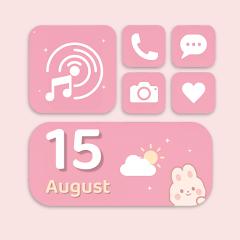
The application contains an extensive library of more than 1,000 complete theme packages. These collections span a wide range of aesthetic genres, including dark minimalism, anime, cyberpunk neon, soft pastels, and seasonal holiday designs. Rather than requiring users to manually match separate assets, the suite enables one-click application: selecting a theme downloads the high-resolution wallpaper, replaces standard application icons with stylized variants, and populates the home screen with coordinated calendar, clock, and weather widgets.
Beyond pre-made packages, the app features an integrated DIY Wallpaper Creator. This tool allows users to import personal photos, apply filters, configure borders, and add graphical stickers to construct custom backgrounds.
Architecturally, the application handles icon theming on stock launchers by generating standard Android shortcut intents. Because locked OEM launchers (such as default Pixel or Samsung setups) restrict external utilities from directly modifying system icon assets, the application creates custom shortcut intents linked to underlying apps. The app also includes a custom Control Widget overlay that utilizes the AccessibilityService API to provide quick access to volume levels, display brightness, and Do Not Disturb controls without collecting user telemetry.
Pros & Cons
Extensive library featuring over 1,000 unified theme collections containing matching wallpapers, icons, and widgets.
Integrated DIY Wallpaper Creator enables fine-grained graphic composition using custom stickers, frames, and filters.
Streamlined one-click replacement mechanism simplifies the application of comprehensive visual overhauls.
Functions smoothly across default stock launchers without requiring a full launcher substitution.
Includes an aesthetic Control Widget overlay for unified system toggle access.
High update frequency delivering continuous seasonal and trending graphic templates.
- ✕
Shortcut-based icon deployment can result in small shortcut badge indicators on certain OEM launchers.
- ✕
Free tier requires regular rewarded video advertisement viewing to unlock specific premium theme bundles.
- ✕
Running simultaneous animated widgets alongside real-time control overlays can increase background RAM consumption.
Download
 Get it on Google Play
 Get it on App Store
FAQs
Does the application permanently alter native system app files?
No. The app creates standard home screen shortcut redirects displaying stylized icons; original system applications and icons remain intact in the system app drawer.
Why does the control panel widget require Accessibility permissions?
Accessibility permissions allow the floating control panel to execute system adjustments (such as volume levels and Do Not Disturb mode) from within its custom graphical HUD.
Can individual themed elements be mixed and matched across different packs?
Yes. Users can combine a wallpaper from one theme bundle with the icon sets and calendar widgets of another.
Why do small arrow badges appear on newly created app icons?
Certain Android OEM launchers (such as standard Pixel or older One UI launchers) enforce a security watermark on all third-party desktop shortcuts created via external intents.
Can custom widgets be resized dynamically on the home screen?
Yes. Widgets support standard Android home screen scaling matrices (2x2, 4x2, 4x4) depending on the user's grid layout.
Hot Reviews
Summarized from Google Play reviews and community discussions.
Users praise the seamless matching between icon designs, backgrounds, and clock widgets, eliminating the effort of manual aesthetic curation.
Feedback highlights the DIY tool as a flexible utility for crafting personalized collage backgrounds with custom stickers.
Reviews note that certain device firmware automatically appends shortcut arrows to generated icons, which can slightly disrupt visual cleanlines.
Users observe that accessing premium themes frequently involves watching full-length rewarded video advertisements.