Lock Screen OS


Overview
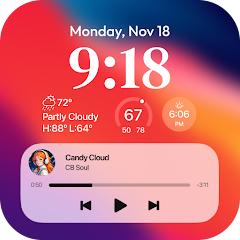
The functional dichotomy between Android's open component architecture and iOS's structured lock screen environment has created continuous demand for cross-platform interface emulators. Lock Screen OS, developed by Apps Genz, is designed to recreate the Apple iOS lock screen paradigm within the Android operating system. The software replicates the visual hierarchy, dynamic depth-effect clock typography, modular informational widgets, and clustered notification mechanics characteristic of modern iOS releases.
From an architectural standpoint, replacing the native Android secure lock screen cannot be achieved via standard launcher replacements due to the security boundaries of the Android OS Keyguard framework. Consequently, Lock Screen OS operates as an elevated system overlay wrapper. It achieves its visual dominance through several sensitive Android system permissions: The System Alert Window permission (DRAW OVER SCREEN) enables the application to render full-screen UI views over native windows, home screen launchers, and third-party applications. Accessibility Services intercept hardware button presses (such as the power key), monitor window state changes, and detect screen-off broadcast signals to instantly trigger the overlay. The Notification Listener Service ingests incoming system alerts, parsing content strings and actions to render them within simulated iOS expanded, stacked, or hidden notification carousels. Additionally, telephony and camera access handle lock screen behavior during incoming voice calls and support quick-launch camera shortcut buttons.
While Lock Screen OS successfully reproduces the visual aesthetics of the iOS lock screen—including multi-profile switching, customizable font weights, and glanceable weather/battery widgets—its architectural reliance on overlay rendering introduces fundamental trade-offs. It operates as a cosmetic overlay rather than a hardware-backed cryptographic gatekeeper. Users seeking visual parity must balance these aesthetic advantages against the performance overhead inherent to continuous accessibility polling and background service execution.
Pros & Cons
Accurately replicates the iOS lock screen aesthetic, including dynamic typography, depth effects, and wallpaper styling.
Provides a versatile multi-profile lock screen switcher, allowing users to customize and cycle through themed presets.
Offers flexible notification display options, supporting stacked, expanded list, and discreet hidden view modes.
Incorporates glanceable companion widgets for checking weather conditions, battery levels, and calendar events.
Features convenient quick-action triggers on the lock surface for immediate flashlight and camera activation.
- ✕
Contains frequent, intrusive interstitial advertisements throughout configuration and customization workflows.
- ✕
Functions as an overlay rather than a secure keyguard, risking brief screen flashes of the home screen upon waking.
- ✕
Poses potential touch-unresponsiveness or passcode lockouts if accessibility services are stopped by background memory managers.
- ✕
Increases background power consumption due to persistent accessibility polling and overlay state maintenance.
Download
 Get it on Google Play
 Get it on App Store
FAQs
Does Lock Screen OS offer cryptographic security equivalent to the Android system lock?
No, Lock Screen OS operates strictly as an interface overlay. For genuine hardware encryption and device security, users must maintain an active native system PIN or biometric lock, as software overlays can be bypassed in Safe Mode.
Why does the application require Accessibility Service authorization?
The Accessibility Service permission is required to detect screen state transitions, capture hardware power button events, and render the custom lock surface over running applications.
What causes the brief flash of the Android home screen before the lock screen appears?
This latency occurs when Android's native Window Manager wakes the display before the overlay process initializes. Disabling battery optimization for Lock Screen OS helps keep the background process active in memory.
How can a user regain access if the lock screen interface becomes unresponsive?
If touch responsiveness fails, users should perform a hardware restart (holding Power + Volume Down), access the device in Safe Mode, and adjust the app's permission settings or remove the package.
Does Lock Screen OS adapt correctly to landscape orientation on tablets?
Currently, Lock Screen OS is optimized primarily for portrait orientation on smartphone displays, which can cause visual scaling issues on tablets locked in landscape mode.
Hot Reviews
Summarized from Google Play reviews and community discussions.
Users frequently commend the accurate iOS aesthetic, font choices, and fluid animations, but express significant frustration regarding the high frequency of full-screen interstitial ads during setup.
Feedback often highlights a brief visual delay upon waking the phone, where the underlying Android home screen or active app flashes briefly before the lock overlay takes focus.
Critical reviews point out stability issues where swipe gestures fail or passcodes are rejected after system updates, forcing users to execute hard device restarts to regain access.
Positive reviews highlight the ease of creating distinct lock screen wallpapers paired with matching clock fonts, praising the seamless switching between specialized work and casual profiles.