
DeepL Translate
This one is a trade, and a clear one: around 30+ core languages and no function at all without a connection, in exchange for camera, photo, voice and handwriting input, whole-file translation and a phrase-level alternatives tool. Well equipped for work at a desk; your language pair and the reliability of your connection decide whether it travels.
- People whose working languages sit inside a focused list — our source material puts the catalogue at around 30+ core languages, weighted towards European and major Asian and global markets
- Bilingual professionals checking their own outgoing writing: published feedback describes people running messages to international colleagues through the app and swapping individual phrases before sending
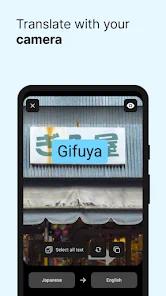
- Anyone who needs text off a surface rather than out of a keyboard — real-time camera translation, photo uploads and hand-drawn character input are all recorded input modes
- People with whole files to handle: our FAQ records a document translation feature on mobile that takes compatible file uploads
- Writers who want an editing pass in the same place they translate — DeepL Write is a separate assistant inside the app aimed at text you wrote yourself
- Business and enterprise accounts that need SSO sign-in and custom glossaries
- Anyone who needs to translate without a connection — our cons list and our FAQ both record that the app has no offline mode and must reach its cloud servers to work
- Travellers who expect it to hold up in the air, on a roaming SIM that has not attached yet, or anywhere coverage drops — the app is cloud-dependent by design, and travel is where phone networks are least dependable
- People working in a language pair outside a roughly 30+ language catalogue — the live Play listing is the authoritative source for what is currently supported
- Anyone who dictates at length: our records report no automatic punctuation, and a microphone that shuts off during brief pauses
- Free-tier users who need formality control or custom glossaries — our records place both behind a DeepL Pro subscription, along with larger character limits

Overview
DeepL Translate is best judged on what it asks you to give up. Our source material records a focused catalogue of around 30+ core languages, and a design that only functions while it can reach cloud servers. In exchange it offers a wide set of ways to get text in, and tools for working on what comes out. Whether that is a good bargain comes down to two things you can check in a minute: your language pair, and how reliable your connection is where you would use it.
Camera, photo, voice, handwriting — and whole files
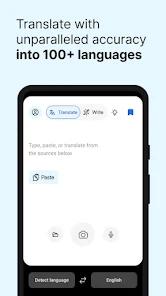
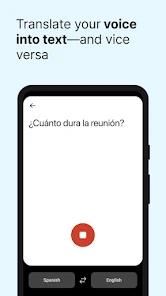
The input range is the most immediately useful thing our records describe: real-time camera translation, photo uploads, voice dictation and hand-drawn character input, with our FAQ adding document translation on mobile, taking compatible file uploads.
That is an app built for text you cannot easily type: a menu, a street sign, a printed letter, a page of a manual, a character someone can draw but not find on a keyboard. Handwriting input is the one that stands out — for a script you have no keyboard for, drawing it is the only practical route in.
Whole sentences rather than word-by-word
Our source material describes the design intent clearly: deep learning models trained on multilingual data, with the engine analysing the structure of an entire sentence rather than converting it word by word, to hold onto idiom, nuance and industry-specific jargon. That is the architecture as our records describe it, and it is the basis of everything else here.
We have not translated a sentence with it, so what we can add is other people’s accounts. One recurring theme in published feedback is exactly this: reviewers describing output that captures natural conversational phrasing and picks up context specific to their field. A second comes from bilingual professionals, who describe running their own messages past the app before sending them to international colleagues.
Tapping a word to change the phrasing
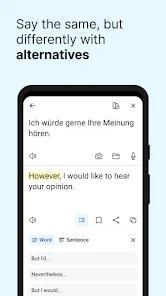
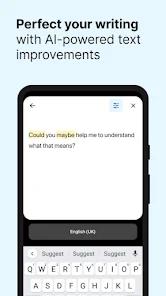
Alternative Translations is what makes that second theme work. Our source material records that you can tap a specific word or short phrase and see other phrasings, then pick the one that fits. It turns the app from something that hands you an answer into something you can negotiate with.
Alongside it sits DeepL Write, recorded in both our source material and our FAQ as a built-in AI writing assistant suggesting grammatical corrections, better word choices and stylistic or clarity improvements. It is not a translation tool but an editing pass aimed at text you wrote yourself.
For business and enterprise accounts, our source material records Single Sign-On login and tools to build custom glossaries, which matter when an organisation has fixed wordings for product names or internal terminology.
Around 30+ core languages
Our source material is direct about the catalogue: around 30+ core languages, weighted towards European and major Asian and global markets. Our cons list records that same shape as a limitation.
It is also the one fact here you can settle against your own needs in a minute, and it is worth settling first: if your language pair is not on the list, nothing else in this review matters. The current list lives on the live Play listing.
What a DeepL Pro subscription covers
Our cons list records character limits on the free tier for the text you translate at once, and two customisation tools behind a paid plan: custom glossaries and tone adjustment. Our FAQ narrows the second further — choosing between formal and informal tone is part of DeepL Pro, and it names German and French as examples of languages where that distinction applies.
That matters to a particular user. If you are writing to a German or French colleague and formal versus informal address is the difference between a normal message and an awkward one, formality selection is not a decorative setting; it is recorded as a paid feature. The in-app purchase screen and the Play listing are where a subscription’s current cost and coverage are set out.
The microphone stops when you pause
Dictation is the one weakness our material records twice, independently, and the two accounts match. Our cons list records that the voice tool lacks automatic punctuation and that the microphone can shut off too quickly during pauses. A recurring theme in published feedback describes the same behaviour from the user’s side: the microphone cutting out during brief pauses, leaving people speaking rapidly without stopping to avoid restarting the dictation.
Both halves matter in practice. No automatic punctuation means a dictated paragraph arrives as one undifferentiated run of words, and punctuation is not decoration in a translation — it is where the sentence boundaries are. A microphone that treats a pause for thought as the end of an utterance changes how you speak: not at your own pace, but at the pace the timeout allows. For a short phrase at a counter, fine. For anything longer, dictation here is a second-choice input rather than a first.
It does not work without a connection
This is the sharpest practical fact here, and our records state it twice. Our FAQ gives the reason: the translation models run on cloud-based neural networks, so an active internet connection is required. Our cons list states the consequence — no offline functionality, and a stable connection needed to reach the translation servers.
Note who that lands on. Our own source material names travellers among the people this app is for, and travel is where a phone’s connection is least dependable: in the air, at a border before a roaming SIM attaches, on a rural road, anywhere a data plan has run out. A desk user on office Wi-Fi will never meet this limitation. A traveller may meet it at the exact moment the app would have been most useful, which makes this a tool you plan a connection around rather than one you assume will be there.
When the app cannot see a connection
Separately from the design above, one recurring theme in published feedback describes a bug: the app showing a connection error or failing to recognise that the phone is online, blocking translation until it is reinstalled.
These are two different problems. The first is by design and predictable — no signal, no translation. The second is the app failing to see a connection that exists, with reinstalling reported as the route back.
The listing itself
Our source material places the developer, DeepL SE, in Cologne, Germany, and our records carry a Play update of Apr 3, 2026 — a little over five months before this review, on a listing whose 4.7 average rests on 391,321 ratings.
Who it’s not for
If you need translation when the network is gone, this is the wrong app, and the limitation is structural rather than a bug awaiting a fix. Dictation-heavy users will meet the punctuation gap and the microphone timeout. And if formality control or a glossary is what you came for, our records place both behind a paid plan.
Our take
We land at 4.5, two-tenths under the store’s 4.7, and the gap sits on dictation, not on the offline limit that first looks like it should carry it.
The tempting argument is the offline one. Our own source material names travellers among this app’s audiences, and the same material records that it cannot work without a connection. Those two facts do pull against each other — but that is a mismatch inside a description, not a fault inside the product. Cloud-only translation is a stated, static property of the app — our FAQ gives it as the reason the thing works at all — and it applies identically to everyone who opens it. An average built entirely under that condition has already absorbed it. Charging it now would be charging the app for the shape our own records say it has. The offline limit decides who this suits; it does not tell you how well the app translates for the people it does suit.
Dictation is a different kind of thing. Nobody choosing a translator agrees in advance that the microphone will stop when they pause for thought, or that dictated text will arrive without punctuation. That is behaviour rather than a term of purchase, and our material records it from two directions — our own cons list and a recurring theme in published feedback — which is corroboration rather than repetition. It degrades one of the recorded routes into the app that does not need a keyboard, and it is a fault no buyer could have priced in from the listing. The reported connection error sits in the same class and adds to that gap without widening it much.
The catalogue size and the Pro gating of character limits, glossaries and formality did not move the number either, and for the same reason: both are disclosed shapes of the product a buyer weighs on the store page.
What holds the score high is how much the rest of the offer covers: four ways to get text in without typing it, whole-document translation, a phrase-level alternatives tool that lets you argue with the result, and a separate writing assistant for your own prose. For anyone working between a handful of major languages on a dependable connection, that is a strong package.
How We Evaluate
We assess every app against the same checklist: what it delivers versus what it promises, how honest the pitch is, where real users hit friction, and who should look elsewhere. We did NOT hands-on test this app. We did not install it, translate a single sentence with it, point the camera at anything, dictate into it, upload a document, or take out a subscription. That matters more here than it would for most apps, because the dimension people care about most in a translator — whether a given translation is any good — is exactly the dimension we have not measured. Where this review touches translation quality, it reports the design our source material records and the results published reviewers describe, and it stops there. This assessment rests on the app's Google Play listing signals (a 4.7 rating across 391,321 ratings, 10M+ downloads, the Books & Reference category, 7 screenshots, a Developer field reading DeepL SE, and a recorded Play update of Apr 3, 2026), the description we hold on file, the pros and cons recorded in our database, our own editorial FAQ, and the themes in published user feedback. One note on that last source: the star labels attached to published feedback in our material do not track the content of that feedback, so we treat those entries as recurring themes only, never as a measure of how many people hit each one, and never attach a rating to any of them. Our material carries no price figures and no list of supported languages, so we quote neither. One boundary worth naming: this is a review of a piece of software. It is not advice on whether any translation it produces is fit for legal, medical, official or contractual use. Those decisions need a qualified human translator, and nothing here speaks to them.
Pros & Cons
The platform delivers highly accurate, context-aware translations that sound more natural than standard translation engines.
The integrated "DeepL Write" assistant provides helpful grammatical corrections and stylistic suggestions to improve overall writing quality.
It offers multiple input modes, including instant camera translation, photo uploads, voice dictation, and handwriting recognition.
The "Alternative Translations" feature lets users tap specific words to explore different phrasing options for their sentences.
Enterprise-level security, including SSO support, ensures that sensitive business documents are translated securely.
- ✕
The free tier enforces strict character limits, and key customization tools—such as glossaries and tone adjustment—are locked behind a paywall.
- ✕
It supports fewer languages than its main competitors, focusing primarily on European and major global languages.
- ✕
The voice dictation tool can be difficult to use, as it lacks automatic punctuation and the microphone can shut off too quickly during pauses.
- ✕
The app lacks offline functionality, requiring a stable internet connection to communicate with its cloud translation servers.
Download


FAQs
Is DeepL Translate free to use?
Yes. The core app is free to download and offers basic translation tools. Advanced features, such as larger text limits and tone adjustments, require a DeepL Pro subscription.
What is the "DeepL Write" feature?
DeepL Write is an built-in AI writing assistant that analyzes your text to suggest grammatical corrections, better word choices, and stylistic improvements.
Does the app support offline translation?
No. DeepL relies on powerful cloud-based neural networks to process its translation models, meaning it requires an active internet connection to work.
How do I adjust the formality of my translation?
The option to choose between formal and informal tones (for languages like German or French) is available as part of the paid DeepL Pro subscription.
Can the app translate entire files or documents?
Yes. The mobile application includes a document translation feature that allows users to upload and translate compatible files.
Hot Reviews
Users frequently praise DeepL for producing translations that capture natural conversation and industry-specific context much better than traditional, literal translation tools.
A common complaint is that the voice recognition microphone cuts off too quickly during brief pauses, requiring users to speak rapidly without stopping to avoid having to restart their dictation.
Some reviews report bugs where the app displays a connection error or fails to recognize that the phone is online, preventing translations until the app is reinstalled.
Many bilingual professionals state that they use the app to double-check their written messages. The ability to swap out specific phrases with natural-sounding alternatives helps them communicate clearly with international colleagues.