Rummy 500 : Relaxing Card Game

Overview
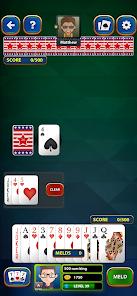
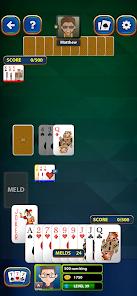
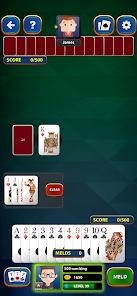
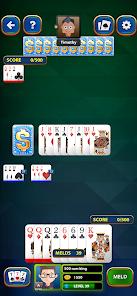
Rummy 500: Relaxing Card Game by Garia Games Ltd is a single-player, offline-focused mobile app that brings the strategic complexity of Persian Rummy, Pinochle Rummy, or 500 Rum to mobile devices. Designed to provide a peaceful gaming experience, the app avoids forced multiplayer matchmaking, queue times, and competitive timers. Instead, it prioritizes a smooth and uninterrupted single-player card layout. The core game uses a standard 52-card deck plus Jokers; players are dealt 13 cards and must strategically draw, meld, and discard to reach a target score of 500 points.
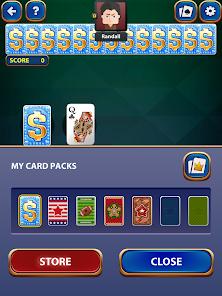
A key strategic element of Rummy 500 is the discard pile mechanic, which allows players to draw multiple cards from the discard pile to retrieve a specific card, provided they immediately play it in a valid meld and add the rest to their hand. Garia Games has designed an intuitive interface to support this rule, offering options for manual or automatic card melding, automated score calculation, and a selection of premium card designs.
Additionally, the game features a linear progression system with over 500 levels, allowing players to earn achievement badges as they play against computer-controlled opponents.
While the single-player design is highly polished, some users note issues with AI difficulty and discard-pile rules. Specifically, the AI's play patterns on higher difficulties can feel overly precise, leading some players to feel it has an unnatural advantage.
Furthermore, some users have reported occasional logic errors where the app blocks valid moves from the discard pile, even when the player holds a matching card in hand. Garia Games maintains active customer support to address these balance and rule glitches.
Pros & Cons
Distraction-Free Offline Gameplay: Optimized to function entirely without internet access, providing a clean experience with minimal visual clutter.
Customizable House Rules: Allows players to toggle manual or automatic card melding, letting users adjust the pace of play.
Thorough Progression Tracking: Features a 500-level achievement ladder with collectible badges and six distinct leaderboards to track performance.
Generous Free Coin System: A recurring coin distribution system ensures players can access custom card designs without spending money.
Accessible and Clear Visuals: The premium card shop offers high-contrast card faces with larger fonts, helping reduce eye strain.
Affordable Ad Removal Option: Offers a low-cost, permanent ad-removal option or Diamond Club access to remove all programmatic ads.
- ✕
Perceived AI Advantages: The computer's play on higher difficulty levels can feel overly defensive and mathematically perfect.
- ✕
Occasional Discard Logic Glitches: Intermittent errors can block valid card pulls from the discard pile, disrupting planned strategies.
- ✕
Lacks Live Multiplayer Lobbies: The application is strictly single-player, with no online multiplayer or matchmaking modes.
- ✕
No Cooperative Team Modes: Gameplay is limited to 1v1 formats against the computer, with no options for team-based play.
Download
 Get it on Google Play
  Get it on App Store
 FAQs
How are points calculated in this mobile edition of Rummy 500?
Cards from 2 to 9 score face value, while 10s, Jacks, Queens, and Kings score 10 points. Aces score 15 points (unless played in low runs), and Jokers award 15 points.
Can a player sync their progress when switching between Android and PC?
Yes, linking the game to a Facebook account allows seamless backup and sync of level progress and coins across compatible devices.
What is the difference between Classic and Quick modes?
Classic mode follows standard scoring rules to 500 points, while Quick mode uses a shortened format with smaller target scores for faster sessions.
Is it possible to permanently disable advertisements within the app?
Yes, players can permanently remove all ads via a low-cost in-app purchase or by joining the Diamond Club tier.
What should a player do if the discard pile selection blocks a valid meld?
If a valid meld is blocked, users can toggle the "Manual Meld" setting or send a detailed screenshot to support@gariagames.com.
Hot Reviews
This app brings back fond memories of playing classic card games with family. The interface is clean, loading is fast, and the offline single-player setup makes it a great way to unwind on long commutes without worrying about Wi-Fi or data limits.
While the game is generally excellent, it occasionally suffers from a bug that prevents players from drawing deep into the discard pile, even when they hold a valid matching card in hand. This issue can disrupt an otherwise strong strategy.
Unlike many card apps that lock core features behind heavy paywalls, this game handles monetization well. A single ad plays on loading, and the option to remove ads is reasonably priced. The custom card faces are also clear and easy to read.
The AI on higher difficulty levels plays a bit too perfectly, tracking cards in a way that feels mathematically calculated rather than casual. It remains a fun challenge, but it can feel punishing for relaxed play.