
Mi Video-Short Video Download
Mi Video is really two products under one icon: a genuinely capable local player — 4K MKV with hardware acceleration, gesture controls, a password-protected vault, casting and PiP — and an ad-supported online service that increasingly crowds it, with pause-screen ads and a short-video 'Moment' feed you can't permanently switch off. If it's already your Xiaomi phone's default and you can tolerate the online push, the player underneath is good; if you want a clean, ad-free local player, that's the friction to weigh.
- Xiaomi and MIUI/HyperOS owners who already have Mi Video as their default player and want capable local playback — 4K MKV, external subtitles, gesture controls, DLNA and Chromecast casting, background audio and picture-in-picture — without installing anything extra
- Users who value that broad, hardware-accelerated format support and don't mind, or are willing to tolerate, the in-app ads and the online content the app pushes alongside local files
- Anyone who wants a clean, ad-free local player without a forced short-video feed — the 'Moment' feed can't be permanently disabled and re-prompts to reactivate every 30–90 days
- Privacy-conscious users uneasy about analytics that fuel targeted ads or about the documented historical security findings, and owners of non-Xiaomi phones who are free to pick a lighter dedicated player instead









Overview
Mi Video is really two products sharing one icon, and the tension between them is the whole story. Underneath is a genuinely capable local media player — the kind that opens a 4K MKV with hardware acceleration and simply plays it — and layered on top is an ad-supported online service that has grown more insistent than the player it wraps. We think the playback engine is good and worth crediting plainly — and that anyone installing this by choice, rather than finding it preloaded, deserves an equally plain account of the ads, the short-video feed you can’t permanently switch off, and a historical security finding worth knowing about. Where you land depends almost entirely on whether you already own a Xiaomi phone.
The scale, and why it needs context
Start with the numbers, because they can mislead. Mi Video carries a 4.5 rating across roughly 1,174,433 ratings, with more than a billion installs — figures that would signal a runaway hit for almost any other app. Here they mostly signal distribution. Mi Video is the default, preinstalled media player on Xiaomi’s MIUI and HyperOS phones, so the overwhelming majority of those installs arrive with the hardware rather than through a deliberate download. That doesn’t make the score meaningless, but the 4.5 reflects a preinstall base, not a billion people who sought it out — so we weigh recurring review themes and actual behavior more heavily than the headline number. The app is also available for general Android, and it’s for that audience — people choosing it — that the trade-offs matter most.
The local player is genuinely good
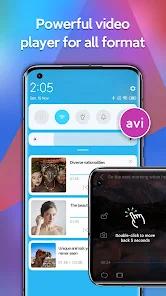
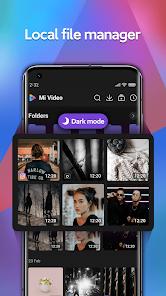
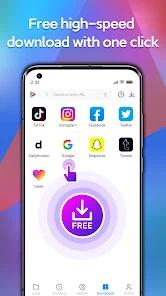
Credit where it’s due. As a local player, Mi Video is capable. It handles the major containers — MKV, MP4, AVI, MOV, M4V, FLV — and leans on hardware-accelerated decoding to do it, which is why users consistently report that high-bitrate 1080p and 4K MKV files render smoothly with minimal frame drops. That corroboration matters: smooth, hardware-accelerated playback of heavy files is the single most-praised thing about the app, and it reads as a real strength rather than marketing. The gesture interface is the other well-liked piece — swipe for volume, brightness, and seeking — and it’s responsive enough to feel natural. Round that out with multilingual subtitle support that imports and syncs external .srt files, background playback and picture-in-picture, DLNA and Chromecast casting to a TV (Wi-Fi permitting), and a password-protected vault for local files, and the feature list of the player proper is legitimately strong. There’s also a multi-platform downloader that can pull video from several social channels. Taken in isolation, this is a good media player.
The ads are the loudest complaint
The problem is that it’s increasingly hard to use the player in isolation. Mi Video’s focus has shifted from local utility toward an ad-supported online service, and that shift arrived with significant advertising — full-screen interstitials, banners, and unskippable video ads. The specific friction users flag most is the pause-screen ad: pause a local file and an ad can appear, and by recurring reports those banners can cover up to roughly half the screen. Consider how that lands: you’ve opened a video stored on your own device, you pause it, and part of the frame is taken over by an ad you can’t skip. For an app whose best quality is clean local playback, ad interruptions layered onto offline files are the sharpest contradiction in the product — and the most common complaint in the feedback we reviewed.
The “Moment” feed and the online push
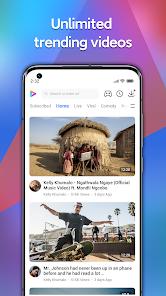
Alongside the ads sits “Moment,” a TikTok-style vertical feed of short-video clips built into the app. Whether you want a scrolling short-video feed inside your media player is a matter of taste; the friction is that you can’t fully opt out of it. Per the app’s own FAQ, there is no permanent disable toggle — you can opt out of personalized content, but the feed stays active and re-prompts you to reactivate roughly every 30 to 90 days. That’s the mechanism behind a recurring user sentiment that Mi Video feels less like a clean local utility and more like an ad-heavy social portal. The online services are, in effect, mandatory — pushed in ways that are difficult to switch off for good, resurfacing the prompts even after you decline.
Data, and a domain caveat worth knowing
Two more practical caveats belong here. The first is data. Files you place in the password-protected folder are locally secured, but the FAQ is candid that general analytics collect device and metadata during playback to serve targeted ads — so the private vault protects specific files without changing the app’s broader ad-driven data model. The second is useful technical trivia: some users try to tame it by blocking the domain video.intl.xiaomi.com at the network level, but Xiaomi shares that domain across Mi Weather, Mi Browser, and Mi Video, so blocking it can break video content in those other MIUI apps. It’s the kind of side effect that turns a tidy fix into a new problem — worth knowing before you reach for it.
The security finding, framed precisely
One more item needs stating carefully, without alarmism. Security researchers have reported that older versions of the app transmitted sensitive telemetry — including user credentials and the email address linked to the Xiaomi Account — via unencrypted implicit broadcasts that other apps on the same device could intercept. We want to be exact about what that is and isn’t. It is a documented, historical finding raised by security audits about older builds, and it’s a legitimate reason for privacy-minded users to be cautious. It is not a claim that the current version is compromised or that Xiaomi is leaking data today; we have no basis to assert that, and we don’t. We surface it because it’s real, citable, and the kind of context a careful reader would want — not as a live accusation.
The nagging bugs
On the smaller-but-annoying end, a persistent stability quirk: some users report that Mi Video auto-disables after a device reboot and has to be manually re-enabled through the Play Store. It’s the sort of maintenance friction that shouldn’t exist on a default system app, and it shows up often enough in feedback to mention.
What recurring reviews tell us
Put the feedback together and it splits cleanly. The praise is specific and consistent: excellent hardware acceleration, smooth 4K MKV playback, responsive gestures. The criticism is equally specific: ad obstructions on pause, an online feed that can’t be permanently disabled, and reboot-related re-enable bugs. The two camps aren’t really arguing — they’re describing the two halves of the same app: people love the player and resent the service bolted onto it, which is exactly the tension the 4.5 average smooths over.
How it compares
The natural comparison isn’t to another big-brand app but to the category of dedicated, lightweight local players — including clean, ad-free and open-source options — whose entire appeal is that they just play files, with no ads and no online push. Against that bar, Mi Video’s playback engine competes well on format support and hardware acceleration, but it carries baggage those players don’t: the ads, the feed, the analytics-for-targeting model. We won’t name specific competitors or invent version numbers and prices, but the shape of the choice is clear: Mi Video gives you a capable player wrapped in an online service; a dedicated third-party player gives you the playback without the wrapper — and on a non-Xiaomi phone, that alternative is freely available to you.
A note on recency
The app is actively maintained: Google Play lists a March 19, 2026 update, with 11 screenshots on the listing. This isn’t an abandoned utility — it’s a current, evolving product, which is part of why the balance has tilted toward the online service over time.
Our take
Mi Video is a good local player attached to an ad-supported online service you didn’t necessarily ask for, and your verdict should follow which of those you weight. If you already own a Xiaomi phone, Mi Video is your default, and you want capable local playback — 4K MKV, external subtitles, gestures, casting, background audio, picture-in-picture — and you can shrug off the ads and the feed, it does the core job well, and there’s little reason to install anything else. If you want a clean, ad-free local player without a forced short-video feed, if the analytics-for-targeted-ads model or the documented historical security findings make you uneasy, or if you’re on a non-Xiaomi phone and free to choose, a lighter dedicated player will serve you better. We land at a modest-but-fair rating: the player underneath is genuinely capable, the online-service friction is genuinely real, and this is a situational pick whose value depends almost entirely on whether you came to it by choice or found it already installed.
How We Evaluate
We assess every app on the same checklist: what it actually delivers versus what it promises, how honest the pitch is, where real users hit friction, and who should look elsewhere. We did NOT hands-on test this app — we did not install it, play files through it, or measure playback ourselves. This assessment is grounded in the app's Google Play listing and description, its stated features (broad container support with hardware acceleration, the gesture UI, the password-protected vault, background playback and picture-in-picture, external subtitle syncing, DLNA/Chromecast casting, and the "Moment" short-video feed), the pros and cons in our database, the developer FAQ, the recurring themes in published user reviews, and the store signals: a 4.5 rating across roughly 1,174,433 ratings and 1B+ installs — noting that Mi Video ships preinstalled as the default player on Xiaomi devices, which drives much of that scale — plus 11 screenshots, a March 19, 2026 update, and developer Mi Video (Xiaomi Inc.). The security concern here is a documented historical finding about older versions, attributed to security reports rather than asserted about the current build. Where we cite user sentiment, we are reflecting documented recurring feedback rather than personal sessions, and we do not attach star ratings to it.
Pros & Cons
Broad Format Compatibility: Plays modern file containers, including 4K MKV, MP4, and FLV.
Responsive Gesture UI: Simple touch gestures allow easy control over brightness, volume, and zoom.
Secure Storage Vault: Users can isolate personal files in a password-protected directory.
Multi-Platform Scraper: Supports downloading video content from multiple social channels.
Background Playback Engine: Supports background audio playback and picture-in-picture mode.
Multilingual Subtitle Support: Easily imports and synchronizes external .srt subtitle files.
- ✕
Intrusive Advertisement Model: Frequent full-screen ads, banner ads, and unskippable video ads.
- ✕
Mandatory Online Services: The app pushes online streaming services that are difficult to disable permanently.
- ✕
Data Security Risks: Historical vulnerabilities showed potential for data leakage via implicit broadcast intents.
- ✕
Domain Integration Issues: Blocking domains like video.intl.xiaomi.com can break associated MIUI utility apps.
Download
 Get it on Google Play
  Get it on App Store
 FAQs
How can I permanently disable the online streaming feed in Mi Video?
There is no permanent disable toggle. Users can opt out of personalized content, but the feed remains active and will prompt for re-activation every 30 to 90 days.
Are local videos safe from third-party data tracking in Mi Video?
While files in the private folder are locally secured, general application analytics collect device and metadata info during playback to serve targeted ads.
Why does blocking video.intl.xiaomi.com cause issues in other MIUI apps?
Xiaomi's system architecture shares this domain across Mi Weather, Mi Browser, and Mi Video. Blocking it can break video content in these linked apps.
Does Mi Video support cast playback to smart TVs?
Yes, Mi Video supports wireless casting to DLNA and Chromecast devices, though performance depends on local Wi-Fi stability.
How does the system reboot bug impact the application?
Some users report that Mi Video automatically disables itself after a system reboot, requiring manual re-activation via the Google Play Store.
Hot Reviews
Users appreciate the player's core playback capabilities, noting that even high-bitrate 1080p and 4K MKV files render smoothly with minimal frame drops.
A common complaint centers on the frequency of ads, with users noting that promotional banners covering up to 50% of the screen upon pausing make offline playback frustrating.
Reviewers express annoyance with the forced "Moment" video feed, stating that the app functions more like an ad-heavy social media portal than a clean local utility.
Several users report that the application automatically disables itself during device reboots, forcing them to manually re-enable it through the Google Play Store.