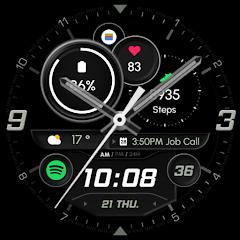
Analog Classic Sport - RE50


Overview
The transition of the Wear OS ecosystem toward standardized declarative framework architectures has transformed smartwatch watch face engineering. Legacy watch faces often relied on continuous background code execution and unoptimized graphics loops, leading to significant battery drain. Analog Classic Sport - RE50, developed by RECREATIVE Watch Faces, is built on the modern Watch Face Format (WFF) co-developed by Google and Samsung. The design blends high-density tactical analog instrumentation with digital readouts, targeting users who want an informative, sporty aesthetic on their Wear OS hardware.
Under the hood, the Watch Face Format moves computational rendering from third-party app processes directly to the Wear OS system server. Because WFF utilizes a declarative XML configuration to define layouts, watch hands, complications, and color styles, the operating system directly manages the render cycle. This architecture enables hardware-accelerated draw passes and allows the watch processor to enter deep low-power sleep states during Always-On Display (AOD) cycles, significantly extending battery life without sacrificing smooth second-hand rendering.
The software provides an extensive array of visual and functional configurations: The complication infrastructure features 5 fully customizable complication slots supporting native Wear OS complication data providers (such as heart rate, step count, barometric pressure, battery level, and world clocks). Direct application triggers provide 2 custom quick-launch touch targets mapped to frequently accessed smartwatch applications. Modular dial customization includes 5 interchangeable analog hand styles (with complete removal options for a clean digital look), 5 distinct outer index dial styles, and 3 tactical military dial textures. A versatile color suite offers 23 distinct accent color palettes yielding over 45,000 unique aesthetic combinations. Finally, an energy-efficient ambient mode optimizes the AOD profile by reducing pixel luminance and suppressing non-essential layers to prevent OLED burn-in and conserve power.
By combining tactical readability with modular customizability, Analog Classic Sport - RE50 demonstrates how modern Wear OS design standards can achieve deep personalization without causing the battery penalties historically associated with complex hybrid watch faces.
Pros & Cons
Engineered on the modern Watch Face Format (WFF) for optimal battery efficiency and hardware-accelerated rendering.
Extensive modular customization with 5 configurable data complication slots and 2 quick-access app shortcuts.
Massive configuration variety with over 45,000 aesthetic permutations across hands, indices, backgrounds, and color palettes.
Highly legible hybrid layout that cleanly balances traditional analog hands with comprehensive digital metrics.
Power-optimized Always-On Display (AOD) mode designed to prevent OLED burn-in while maintaining clear readability.
Native compatibility across modern circular Wear OS devices, including the Samsung Galaxy Watch series and Google Pixel Watch lines.
- ✕
Exclusively compatible with Wear OS 3.0+ devices, excluding older Tizen-based watches or proprietary RTOS fitness bands.
- ✕
The paired phone companion app setup can occasionally cause confusion during initial Play Store installation onto the watch.
- ✕
Dense, tactical sport styling may not align with users seeking strictly minimalist or traditional dress aesthetics.
Download
 Get it on Google Play
 Get it on App Store
FAQs
Which smartwatches are compatible with Analog Classic Sport - RE50?
The watch face is compatible with smartwatches running Google Wear OS 3.0, 4.0, and 5.0+, including the Samsung Galaxy Watch (4, 5, 6, 7, Ultra), Google Pixel Watch (1, 2, 3), and compatible TicWatch models. It is not compatible with Apple watchOS, Huawei HarmonyOS, Garmin, or older Samsung Tizen devices.
How does the Watch Face Format (WFF) improve battery performance?
WFF uses declarative XML to delegate rendering directly to the Wear OS system server. This eliminates the need for a separate third-party background application process to stay awake, allowing the watch processor to remain in deep sleep when the display is in ambient mode.
Can complications display health data from third-party applications?
Yes, the 5 complication slots utilize the standardized Android Wear OS Complication API, allowing them to render data from any installed app that exposes a complication provider (such as Google Fit, Samsung Health, or Strava).
How can visual elements like hands, indices, and colors be customized?
Customization can be performed directly on the watch by long-pressing the watch face and tapping "Customize", or remotely via the paired smartphone's companion app (e.g., Galaxy Wearable or Google Pixel Watch app).
Why does the Google Play Store install a companion app on the smartphone?
The smartphone companion app serves as a delivery bridge to help locate, purchase, and install the standalone watch face onto the connected Wear OS smartwatch.
Hot Reviews
Summarized from Google Play reviews and community discussions.
Users consistently praise the balanced layout, noting that complications remain easily readable at a glance without being obstructed by the analog watch hands.
Reviews frequently highlight the minimal battery impact during daily use, confirming that the modern WFF implementation operates efficiently even with an active Always-On Display.
Customization enthusiasts commend the wide selection of color schemes, military patterns, and removable hands, which make it easy to match various physical watch bands and cases.
Some user feedback notes minor confusion during initial setup, where purchasers had to manually trigger the watch-side download from the "Available on more devices" section in the Google Play Store.