
Facemoji AI Emoji Keyboard
Facemoji is one of the most expressive keyboards on Android: a Simeji-lineage prediction engine that Japanese learners defend, wrapped in a deep personalization, custom-emoji, and AI-shortcut toolkit that earns its 4.7 reputation. Go in knowing it's a feature-heavy, AI-forward hub rather than a minimalist keyboard, and give it the same routine thought about permissions you'd give any third-party keyboard — a point about the whole category, not this app alone.
- People who treat their keyboard as self-expression — camera-roll photo and video themes, face-based custom emoji and stickers, ranked kaomoji, and a deep font-and-symbol drawer — and who live in social apps like TikTok and WhatsApp
- Japanese learners and native speakers who want the Simeji-lineage prediction engine and 2M-entry cloud dictionary that users credit with surfacing kanji and slang other keyboards miss
- Minimalists who want a quiet, distraction-free keyboard — the AI suggestions and expressive layers are the whole point here, and users seeking simplicity report they can clutter the interface
- Privacy-cautious users who'd rather keep typed text off any cloud service, and Japanese-input purists who want the original Simeji's tighter, more traditional focus over Facemoji's global, feature-heavy hub








Overview
Most keyboards want to disappear. Facemoji wants to be noticed. It’s one of the few Android keyboards built around the idea that the thing you type with is also a form of self-expression — custom emoji made from your own face, keyboard skins built from your camera roll, ranked kaomoji, and a font-and-symbol drawer deep enough to retire the conversion websites. With more than 100 million installs and a 4.7 average across roughly 1.38 million ratings, the audience clearly agrees. Our job is to separate what Facemoji genuinely does well from the parts you should walk in with eyes open about.
What Facemoji actually is — and the Simeji lineage
Under the Facemoji brand sits a lineage worth knowing. The app is the global, feature-heavy evolution of Simeji, the Japanese engine that spent years as a gold-standard IME. Developer Nexileap has kept the parts that made Simeji distinctive — most visibly the “Mushroom” (or Mash) button, a quick-access menu for plug-ins, specialized dictionaries, and kaomoji lists — and built outward into a personalization hub aimed at social identity and creative expression. That heritage explains the split personality you’ll notice: a serious linguistic engine on one side, a maximalist emoji-and-themes playground on the other. If you only know the app as “the emoji keyboard,” the prediction pedigree underneath is the part that surprises people.
Making it yours: the DIY theme engine
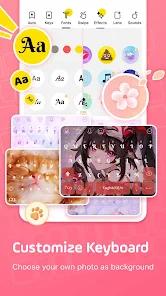
The personalization is the headline feature and, on the evidence, the one people love most. Facemoji’s “DIY Theme” engine lets you build a keyboard skin from your own photos or short video clips — per the FAQ, you open the DIY section of the theme store, choose Create New, and upload a video from your gallery for an animated background. Our database flags this as near-infinite aesthetic flexibility, and that’s a fair description. Facemoji is free to install, but an honest limit on what we can tell you: our source data carries no pricing or monetization detail — no subscription, paywall, or in-app-purchase specifics. If the theme store or any feature later asks you to pay, treat the terms as something to confirm in-app rather than take on our word.
The Genmoji-style creator
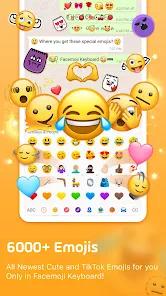
The other marquee creative tool is the custom-emoji creator, which our notes compare to Apple’s Memoji for Android users. It generates custom emoji, stickers, and animated GIFs based on your own facial features, turning the keyboard into something closer to a personal avatar kit than a text field. Paired with a large library of fonts and symbols that don’t send you off to external conversion sites, and a fast-switching interface for moving between emoji, symbols, and numbers, the toolkit is genuinely deep. The breadth is real, and it’s why the app reads as a personalization hub rather than a plain IME.
Prediction and Japanese input: the part users defend hardest
Strip away the cosmetics and the engine underneath is what earns the most heartfelt reviews. Facemoji runs a cloud-based dictionary of more than two million entries, which users credit with accurately predicting modern slang, anime terms, and niche buzzwords that plainer keyboards miss. The strongest sentiment we found came from people learning Japanese: a recurring theme in published feedback describes the cloud dictionary as a “godsend” that surfaces kanji and slang some users say even Gboard fails to recognize. We’d attribute that specific comparison to user reports rather than treat it as a benchmark of our own. If your typing life involves Japanese — or a lot of internet-native slang — this is the feature that would keep you here.
The AI layer
The newer layer is generative AI, and it’s where opinion splits. Facemoji has added “AI Smart Reply” and “Bullet Reply” tools plus automated sticker generation, pitched at speeding up responses in high-frequency chats on TikTok and WhatsApp. For people who live in those apps, the appeal is obvious: fewer taps to fire back a reply or drop a reaction. The trade-off is density. Our own database lists intrusive AI features and suggestions among the app’s cons — they can clutter the interface for anyone who wanted a simpler keyboard. The AI tools are a real convenience for heavy social users and visual noise for everyone else, and which camp you fall into is most of the recommendation.
The “AI slop” and uncredited-art debate
Two related criticisms travel with the AI push, and both are matters of user sentiment rather than settled fact, so we’ll frame them as exactly that. First, a vocal segment of users describes some of the AI additions as “AI slop” — their shorthand for features that feel low-quality or trend-chasing. That’s their characterization, not a verdict we’re adopting. Second, and more delicate: some users have observed that certain AI-generated emoji designs appear to draw on uncredited artistic works, which has sparked an ongoing debate about the ethics of AI-generated content. We want to be precise — this is a documented user concern and a live debate, not an established finding of infringement, and we’re not asserting that any specific art was copied. It’s a contested question worth knowing exists, not a proven charge.
Privacy, and what a third-party keyboard means
Any review of a keyboard has to talk about privacy honestly, and the honest version starts with the category, not this app. Every third-party keyboard on Android is, by design, an input method that can see the text you type — that’s inherent to how an IME works, which is why Android shows the same standard warning for all of them when you enable one. Facemoji is no exception. On the specifics: its cloud-based dictionary collects input data to improve predictions, which our database flags as a genuine privacy consideration to weigh. For its part, Facemoji states that it encrypts data in transit and lets users request data deletion, and its FAQ answers the obvious “does it record passwords or card numbers?” question by pointing to that standard warning and advising caution with any IME. That’s neither a smoking gun nor a clean bill of health. The sensible practice is the one we’d suggest for the whole category — be thoughtful about what you type through any third-party keyboard, and lean on the platform’s own field protections for genuinely sensitive entries. That’s general good hygiene, not an accusation aimed at this app.
How it compares
The most useful comparison isn’t to a rival brand — it’s to Facemoji’s own ancestor. The original Simeji app (com.adamrocker.android.input.simeji) still exists as the more traditional, Japanese-input-focused option, and by the app’s own account it’s the pick for language purists who want a cleaner focus on typing over a global personalization hub. Facemoji is the opposite bet: more features, more expression, more AI, at the cost of more surface area to ignore. So the decision is less “Facemoji versus everything else” and more “do you want the maximalist descendant or the focused original?” Against mainstream keyboards, the differentiators users point to are the depth of theming and the slang-and-kanji prediction — we’ll leave the head-to-head there rather than invent specifics.
A note on recency
The listing shows a Play Store update dated April 3, 2026, so the app is actively maintained rather than drifting — reassuring for something you’ll grant keyboard access. One concrete, still-open rough edge is a known bug where custom typing sounds fail on some Samsung and other hardware; the FAQ pins it on Samsung’s system-level sound management and suggests re-enabling Touch Sounds in Android settings as a workaround.
Who it’s not for
Plainly: if you want a quiet, minimal keyboard that gets out of your way, Facemoji is probably not it. The whole design points the other direction — expressive, AI-forward, feature-dense — and the users who dislike it wanted simplicity and found the suggestions and extras in the way. It’s also not the natural pick if you’d rather keep typed text off any cloud service, or if you’re a Japanese-input purist who’d prefer the original Simeji’s tighter focus. And if the uncredited-art debate around AI emoji sits badly with you, that’s a fair reason to wait and watch how it settles.
Our take
Facemoji earns its 4.7 reputation honestly, and it earns it twice: as a genuinely deep personalization keyboard, and as a Simeji-lineage prediction engine that Japanese learners and slang-heavy typists defend with real warmth. We’d recommend it for exactly those people, and that fit is why we land at 4.3. The honest asterisks are about suitability: the AI layer that delights heavy social users is clutter to minimalists, some users call parts of it “AI slop,” and the uncredited-art debate is real if unsettled. On privacy, we’d say only what’s fair — it’s a third-party keyboard like any other, worth the routine thought you’d give the whole category, with the app stating it encrypts data in transit and offers deletion. Go in for the expression and the prediction, not for a keyboard that disappears.
How We Evaluate
We did not hands-on test Facemoji. This review is a desk assessment grounded in the app's Play Store listing and description, its stated feature set, the pros and cons in our app database, its FAQ, and the recurring themes across published user reviews — read against its 4.7 aggregate rating from roughly 1,381,897 ratings, its 100M+ installs, eight screenshots, and a Play Store update dated April 3, 2026, from developer Nexileap. We also weighed the app's lineage: Facemoji is the global evolution of the Japanese "Simeji" input engine, and several of its defining traits — the Mushroom button, the prediction pedigree — trace back to it. Where we describe a strength or a limit, we tie it to those signals rather than to personal use. The user-sentiment items we cite — the praise for prediction, the "AI slop" complaint, and the uncredited-art debate — reflect documented recurring feedback and an ongoing public discussion, not sessions of our own, and we frame the contested points as contested.
Pros & Cons
Infinite aesthetic flexibility with the ability to use personal videos and photos for keyboard skins.
Superior prediction engine for Japanese learners and native speakers, powered by a 2M-entry cloud dictionary.
Integrated "Genmoji" tool that rivals Apple's Memoji features for Android users.
Massive repository of specialized fonts and symbols that do not require external conversion websites.
Fast-switching interface for rapid movement between emojis, symbols, and numeric pads.
"Bullet Reply" and AI tools that significantly speed up responses in high-frequency social chats.
Comprehensive support for Kaomoji rankings, making it easy to find the most popular Japanese emoticons.
- ✕
Intrusive AI features and suggestions that can clutter the interface for users seeking a simpler experience.
- ✕
Persistent bugs with haptic feedback and custom keypress sounds on certain devices.
- ✕
Privacy implications of "cloud-based" dictionary features that collect input data to improve predictions.
Download
 Get it on Google Play
  Get it on App Store
 FAQs
Is Facemoji the same as the original Simeji keyboard?
Facemoji (com.simejikeyboard) is the global, feature-heavy version, whereas the original Simeji (com.adamrocker.android.input.simeji) is more focused on traditional Japanese input and is the preferred choice for language purists.
Does this keyboard record my passwords or credit card numbers?
Android displays a standard warning for all third-party keyboards. Facemoji states that it encrypts data in transit and allows users to request data deletion, but caution is advised with any third-party IME.
How do I use my own video as a keyboard background?
In the "DIY" section of the app's theme store, you can select "Create New" and upload a video file from your gallery to use as an animated skin.
Why don't the typing sounds work on my Samsung device?
This is a known compatibility issue with Samsung's system-level sound management. Re-enabling "Touch Sounds" in Android settings often resolves this.
What is the "Mushroom" button?
Inherited from Simeji, the Mushroom button is a quick-access menu for third-party plug-ins, specialized dictionaries, and Kaomoji lists.
Hot Reviews
Users frequently praise the app for making "accessing symbols without looking them up" much easier, citing it as an indispensable tool for managing social media accounts.
A vocal segment of the user base has criticized the "AI slop" and the presence of AI-generated art that may involve uncredited sources, suggesting that the app’s quality has dipped in favor of trends.
Reviewers learning Japanese find the "cloud-based dictionary" to be a "godsend," noting that it accurately predicts kanji and slang that even Gboard fails to recognize.