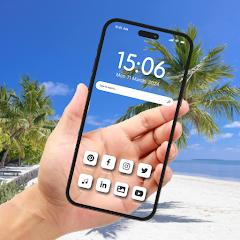
Transparent Phone Wallpaper


Overview
The Android WallpaperService architecture provides an engine for hosting interactive graphics, physics-driven animations, and live sensor feeds directly on the system desktop background. Transparent Phone Wallpaper, published by Wallet Passes Alliance, turns this surface into a real-time camera viewfinder. With more than 70,000 downloads, the utility captures video from the device's camera hardware and renders it smoothly beneath home screen icons and application shortcuts.
The underlying technical mechanics of Transparent Phone Wallpaper rely on Android's WallpaperService and the Camera2 framework. When activated, the application initializes an active camera capture session bound directly to a SurfaceTexture managed by the wallpaper engine. As a result, the camera preview feed streams straight to the desktop window surface beneath system launchers.
The app includes two primary camera viewing modes: a transparent rear-camera mode that makes the device appear see-through during regular home screen navigation, and a front-camera mirror mode useful for quick grooming checks without launching a separate camera application.
Operating a continuous camera feed directly on the desktop involves distinct hardware and performance considerations. The camera sensor, image signal processor (ISP), and GPU rendering pipeline remain continuously active while the home screen is displayed. To manage battery and thermal impact, the wallpaper engine pauses frame capture whenever another application opens full-screen, resuming the camera feed only when returning to the home or lock screen.
The application also includes a customizable digital clock and calendar widget, along with a collection of static HD wallpapers for users who want to switch back to traditional backgrounds.
Pros & Cons
Front-Camera Mirror Functionality: Features a front-facing camera mode that turns the home screen into a quick-access mirror.
Integrated Digital Clock Overlay: Displays custom digital time and date readouts directly over the live camera preview.
Lightweight Application Size: The small installation package (~14.6 MB) keeps local storage usage minimal.
One-Tap Wallpaper Activation: Simplifies configuration through an intuitive, streamlined setup wizard.
Unique Optical Viewfinder Aesthetic: Creates a distinctive see-through desktop visual by streaming live camera feeds beneath home screen icons.
- ✕
Elevated Battery and Sensor Usage: Keeping the camera sensor and image processor active during desktop use increases battery consumption.
- ✕
Variable Low-Light Image Quality: Video preview clarity depends directly on ambient lighting, introducing noise in dark environments.
- ✕
View Obscured by Surfaces: The transparent effect is temporarily blocked whenever the phone rests flat on a desk or is held covered by hands.
Download
 Get it on Google Play
 Get it on App Store
FAQs
Does the transparent live wallpaper keep the camera running when using other apps?
No. The underlying Android wallpaper service automatically suspends camera rendering when another application is running full-screen to conserve battery.
Can I alternate between the rear and front selfie camera for the wallpaper?
Yes. You can switch between the rear camera for the transparent effect and the front camera for the mirror feature within the app settings.
Will keeping the transparent camera background drain battery faster?
Yes. Because the camera sensor and graphics processors are active while viewing the home screen, battery consumption is higher than with static wallpapers.
Does the application record or store video footage captured by the camera?
No. The camera feed is rendered directly to the screen's temporary display buffer without recording or saving footage to storage.
Can the transparent wallpaper be applied to both the home screen and lock screen?
Yes. On compatible Android devices, the system wallpaper manager lets you apply the live camera background to the home screen, lock screen, or both.
Hot Reviews
Summarized from Google Play reviews and community discussions.
The live see-through background provides a fun and unique look that immediately stands out when showing the device to friends.
Having a live front-camera mirror accessible on the home screen makes quick grooming checks convenient without opening a separate camera app.
Prolonged interaction with the home screen causes a noticeable drop in battery percentage due to continuous camera hardware use.
The setup process is straightforward, allowing users to activate the transparent wallpaper and adjust the clock display in just a few taps.