Chester Active WX


Overview
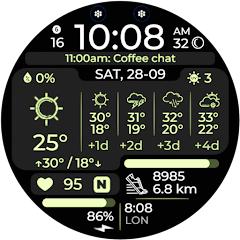
Chester Active WX, designed by CHESTER WATCH FACES, is a premium digital watch face engineered for smartwatches running Google Wear OS 5.0+ (API Level 34 and above), including devices such as the Samsung Galaxy Watch 7, Galaxy Watch Ultra, and Google Pixel Watch series. The watch face is structured for active users who require high-density meteorological forecasting, physical fitness telemetry, and immediate application access directly from their smartwatch display.
Chester Active WX is built using Samsung and Google’s declarative Watch Face Studio and conforms to the modern Watch Face Format (WFF). Unlike legacy Wear OS watch faces that executed standalone Java or Kotlin background runtime code—which often introduced CPU wake-locks, memory overhead, and battery drain—the Watch Face Format is a purely declarative XML specification. The Wear OS system server handles the parsing and graphical rendering of WFF faces directly, shifting execution to low-power co-processors and significantly improving battery longevity.
The defining functional capability of Chester Active WX is its integrated meteorological suite. The watch face provides real-time ambient temperature, daily minimum/maximum ranges, humidity percentages, and ultraviolet (UV) index measurements. Users can toggle the primary forecasting complication between an extended 4-day synoptic outlook and a granular 4-hour micro-forecast. And it offers 30 curated color themes.
Biometric and activity monitoring are tightly integrated into the layout. The lower section displays real-time heart rate readings, cumulative daily step counts, dynamic distance calculations (switchable between kilometers and miles), and battery status indicators. In addition, Chester Active WX includes a celestial moon phase indicator, an unread notification counter, and multiple interactive tap zones that launch system calendars, battery menus, or user-assigned applications. The Always-On Display (AOD) profile maintains essential time, date, and weather elements while heavily dimming non-essential pixels to prevent OLED burn-in and minimize battery drain.
Pros & Cons
Comprehensive meteorological dashboard supporting both 4-day extended and 4-hour micro-hourly forecasts.
Built entirely on the modern declarative Watch Face Format (WFF), ensuring optimized battery performance.
Offers 30 distinct high-contrast color schemes for personalized aesthetic matching.
Robust fitness telemetry tracking steps, heart rate, and automatic metric/imperial distance calculations.
Energy-efficient Always-On Display (AOD) mode designed to protect OLED panels and reduce power drain.
Multiple interactive tap zones providing rapid wrist-based shortcuts to native apps and system metrics.
- ✕
Strictly restricted to circular smartwatches running Wear OS 5.0+ (API 34+), excluding older or rectangular devices.
- ✕
High data density layout can appear visually cluttered to users seeking minimalist or analog aesthetics.
- ✕
Weather synchronization occasionally experiences brief delays following major smartwatch firmware updates.
Download
 Get it on Google Play
 Get it on App Store
FAQs
Which smartwatch devices are officially compatible with Chester Active WX?
The watch face supports circular Wear OS smartwatches operating on API Level 34+ (Wear OS 5.0 and above), including the Samsung Galaxy Watch 7/Ultra and Google Pixel Watch 2/3.
Can the weather forecast display be switched between hourly and daily modes?
Yes. The watch face settings menu permits users to select between a 4-day daily forecast and a 4-hour hourly micro-forecast.
Why is Chester Active WX incompatible with rectangular smartwatches?
The graphical coordinate architecture and complication geometry are compiled specifically for circular smartwatch displays, causing visual clipping on square viewports.
How does the Watch Face Format (WFF) reduce smartwatch battery consumption?
WFF eliminates standalone background executable code, allowing the Wear OS operating system server to render the interface efficiently on low-power co-processors.
How are custom color palettes and complication tap zones configured?
Users customize the face by long-pressing the active watch screen, tapping "Customize," and swiping across the color palettes and complication mapping slots.
Hot Reviews
Summarized from Google Play reviews and community discussions.
Users praise the presentation of weather data, highlighting that the combination of UV index, precipitation, and min/max temperatures is invaluable for daily commute planning.
Reviewers frequently commend the 30 included color schemes, noting that typography remains exceptionally sharp and legible across diverse lighting conditions.
Owners of modern Wear OS hardware report smooth animation frame rates, accurate step metrics, and minimal impact on daily battery discharge rates.
Some feedback notes that weather readings may require several minutes to synchronize with paired phone location providers immediately following initial installation.