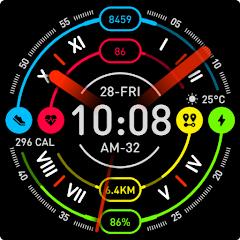
FORM Watch Face


Overview
Wearable computing requires balancing aesthetic expression with thermal and electrical power efficiency. The FORM Watch Face, developed by MARTIAN (Aleksandar Marinov), is an engineered time-keeping and biometric interface designed for Google's Wear OS platform. Tailored specifically for modern Wear OS hardware architectures—including the Samsung Galaxy Watch series (Watch4 through Watch7 Ultra) and the Google Pixel Watch family—the face integrates digital and analog indicators with real-time biometric and meteorological data complications.
The underlying technical foundation of FORM is built on the modern Watch Face Format (WFF) declarative standard introduced by Google and Samsung. In older Wear OS designs, watch faces ran as persistent background Android services with active runtime logic in memory, which caused measurable battery drain during continuous sensor monitoring and display updates. The Watch Face Format standardizes the design into an optimized XML structure, delegating layout rendering, complication data binding, and state calculations directly to the Wear OS display subsystem. Consequently, FORM runs with zero background code overhead, reducing battery consumption while maintaining smooth animations and low-latency data rendering.
The graphical layout of FORM pairs clean legibility with deep theme customization. By offering multiple distinct color palettes, users can adapt the watch face across casual, formal, or high-contrast sports environments.
The Always-On Display (AOD) engine is carefully calibrated to protect AMOLED screens. It maintains an on-pixel ratio (OPR) below ten percent by switching non-essential graphic elements to pure #000000 blacks, dimming active indicators, and applying anti-burn-in pixel shifts. This engineering approach ensures that vital data remains visible in ambient settings without shortening daily device runtimes. It also can show dynamic weather icon accompanied by local temperature.
Pros & Cons
Modern Watch Face Format Architecture: Uses the declarative WFF XML standard, reducing background battery draw and CPU overhead.
Comprehensive Information Density: Gathers time, date, heart rate, step count, battery metrics, and weather details into a balanced hybrid layout.
Power-Efficient Ambient Mode: The Always-On Display engine reduces on-pixel coverage to conserve battery while preventing OLED burn-in.
Extensive Accent Palettes: Provides a broad selection of colorways for both digital typography and analog indices.
Broad Wear OS Compatibility: Fully compatible with Wear OS 4 and Wear OS 5 smartwatches, including Galaxy Watch and Pixel Watch devices.
- ✕
Fixed Complication Placement: The unified hybrid design limits the ability to arbitrarily move primary complication positions.
- ✕
Upfront Purchase Cost: Available as a premium paid watch face ($0.99) without an automated standalone trial version.
- ✕
No Paired Mobile Analytics Dashboard: Functions purely on the smartwatch, delegating long-term fitness trend tracking to host fitness apps.
Download
 Get it on Google Play
 Get it on App Store
FAQs
Is the FORM Watch Face compatible with Wear OS 2 or older Tizen watches?
No. FORM is engineered strictly for modern Wear OS architectures (Wear OS 3.5, 4.0, and 5.0+) that support the modern Watch Face Format.
How is heart rate tracking handled on the watch face?
The watch face hooks into the native Wear OS health complication framework, fetching pulse readings from the watch's PPG sensor without running unneeded background services.
Can the temperature units be switched between Celsius and Fahrenheit?
Yes. The weather complication adopts the system-level temperature settings configured in your paired companion watch settings.
Does the Always-On Display mode consume significant battery power?
No. The AOD implementation uses true-black backgrounds and dimmed color palettes to keep power consumption low throughout the day.
Can I customize colors directly from my smartwatch?
Yes. Long-pressing the watch face opens the on-device customization menu, where you can modify colors and complication data sources directly.
Hot Reviews
Summarized from Google Play reviews and community discussions.
Combining both digital and analog indicators gives the watch face a modern, technical aesthetic that keeps essential daily metrics easily accessible at a glance.
Because the watch face uses the modern Watch Face Format, it maintains high system responsiveness without causing excess battery drain across standard daily usage.
The built-in color palettes let users match their watch display to different watch bands, fitness wear, or professional attire quickly.
Having step counts, heart rate readings, and weather updates visible together eliminates the need to swipe through multiple secondary app tiles throughout the day.