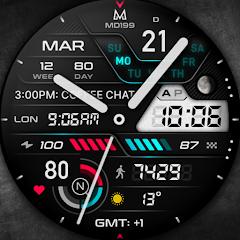
MD199: Analog watch face


Overview
Designed by digital horology creator Matteo Dini, MD199 Analog Watch Face exemplifies modern skeuomorphic hybrid design on the Wear OS platform. Constructed using Samsung’s Watch Face Studio and conforming to Google’s declarative Watch Face Format (WFF), the software targets devices running API Level 33 and above, encompassing modern hardware like the Samsung Galaxy Watch series and the Google Pixel Watch family. MD199 addresses a specialized market segment: users seeking the visual weight and textural depth of high-end mechanical chronographs coupled with the telemetry capabilities of modern digital smartwatches.
The architecture of MD199 departs sharply from runtime-scripted watch engines. By utilizing the declarative Watch Face Format, graphic rendering, second-hand sweeps, and complication updates are executed directly by the operating system’s native rendering layer rather than a background service process. This architectural design dramatically curtails CPU wake locks, minimizes memory pressure, and provides optimal battery discharge curves. Crucially, the Always-On Display (AOD) profile is designed with a low On-Pixel Ratio (OPR), which prevents AMOLED pixel burn-in while maintaining clear legibility under bright ambient lighting.
The layout of MD199 is arranged to balance analog dials with digital readouts. The dial features integrated biometric sensors that display heart rate interval zones alongside continuous heart rate tracking, step counters linked to dynamic daily step-goal meters, and comprehensive temporal data including week-of-year and day-of-year indices.
Customization is structured around modular aesthetic controls. Users can modify the physical styling of the mechanical hands, hide the hands entirely to favor a pure digital chronograph layout, change the accent stripe schemes, and cycle through various LCD backlight hues and brightness levels.
Compared to open-ended watch face builders, MD199 provides a polished, pre-calibrated aesthetic experience. It eliminates configuration overhead while delivering a level of visual realism—characterized by precision metallic textures, multi-layer drop shadows, and balanced dial geometry—that remains rare among digital timepiece faces.
Pros & Cons
Photorealistic skeuomorphic design blending traditional mechanical chronographs with modern digital dashboards.
Declarative Watch Face Format (WFF) architecture ensures superior power efficiency and minimal CPU overhead.
Comprehensive health and temporal dashboard with real-time HR intervals, step progress, and annual indices.
Extensive visual modularity including changeable mechanical hands, LCD background colors, and accent striping.
Burn-in protected Always-On Display (AOD) engineered with a low On-Pixel Ratio for AMOLED screens.
True standalone Wear OS application requiring zero persistent smartphone background runtime.
- ✕
Restricted to devices running API Level 33+ (Wear OS 4 and newer), excluding legacy smartwatches.
- ✕
Customization is confined to pre-compiled visual assets without support for arbitrary user scripting.
- ✕
Metric accuracy requires manual initial permission grants for wearable health sensors and complication providers.
Download
 Get it on Google Play
 Get it on App Store
FAQs
Which smartwatch hardware platforms support MD199?
MD199 supports all smartwatches running Wear OS 4 or higher (API Level 33+), including the Samsung Galaxy Watch series (4, 5, 6, 7, 8, Ultra) and the Google Pixel Watch family.
How does the real-time heart rate monitoring operate on the dial?
Heart rate data is retrieved via native Wear OS health service APIs. Users can initiate an immediate manual measurement cycle by tapping the dedicated heart rate shortcut on the dial surface.
Can the analog hands be hidden to prioritize the digital readout?
Yes. Within the watch face customization menu, users can cycle through alternative mechanical hand styles or select an option to hide the hands completely, prioritizing the underlying digital display.
Is a companion smartphone application required for MD199 to function?
No. MD199 is a standalone Wear OS application. The optional smartphone listing on Google Play serves primarily as an installation helper to guide deployment to connected wearable hardware.
What causes complication fields to show zeros or missing data upon initial install?
This behavior indicates that the watch face has not yet been granted health sensor or background complication data access permissions. Long-pressing the watch face, selecting "Customize," and verifying data sources resolves the issue.
Hot Reviews
Summarized from Google Play reviews and community discussions.
The metallic texture rendering and depth-map drop shadows create a remarkably authentic mechanical watch presentation that rivals luxury physical timepieces.
Integrating step goal completion meters, heart rate zones, and temporal calendar data onto a single dial provides comprehensive information at a glance.
The declarative format implementation results in minimal battery consumption throughout full-day usage, even with the Always-On Display continuously active.
First-time deployment may require manual verification of health and sensor permissions before weather indicators and heart rate readouts populate properly.