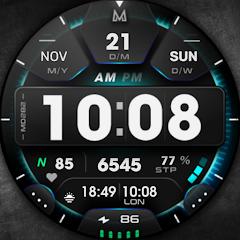
MD282 3D Digital watch face


Overview
MD282 3D Digital Watch Face, created by Matteo Dini MD ® Watch Faces, exemplifies high-density digital chronography for the Wear OS ecosystem. The design blends tactical LCD instrumentation with dimensional shading and surface lighting, simulating a multi-layered mechanical-digital cockpit gauge on circular smartwatch displays.
Engineered using Samsung’s Watch Face Studio under modern Wear OS specifications (API Level 33+), MD282 is optimized for devices such as the Samsung Galaxy Watch series and Google Pixel Watch. The interface features an animated rotating seconds ring that tracks the outer perimeter of the display. The core dial presents an array of vital metrics, including time (12/24-hour sync), full Gregorian date, real-time heart rate monitoring, daily step count, and step goal progression arcs.
Customization is a core strength of MD282. Users can access on-watch configuration menus to adjust background textures, LCD panel tints, accent lights, and outer index markers. The application includes three preset application shortcuts (Calendar, Battery Status, and Measure Heart Rate) alongside four customizable shortcuts mapped directly to user-selected apps. Additionally, two modular complication fields accommodate external data streams such as weather forecasts, atmospheric pressure, or dual-time zones. In Always-On Display (AOD) mode, MD282 uses a low On-Pixel Ratio (OPR) design that dims background elements while keeping the digital clock and primary complications legible.
Pros & Cons
Delivers a detailed 3D skeuomorphic digital dial aesthetic with realistic depth and lighting.
Provides high interaction density with 3 fixed shortcuts, 4 customizable shortcuts, and 2 complication slots.
Features an animated rotating seconds ring around the dial perimeter.
Integrates native health tracking metrics, including step goal progression and heart rate telemetry.
Built using Watch Face Studio for smooth performance across Wear OS API 33+ devices.
Includes an energy-efficient Always-On Display mode with customizable accent colorways.
- ✕
Distributed exclusively as a paid premium application without a standalone free trial tier.
- ✕
Incompatible with legacy smartwatch platforms and older Wear OS versions below API Level 33.
- ✕
The high density of data fields can feel visually crowded on smaller smartwatch casings (e.g., 40mm).
Download
 Get it on Google Play
 Get it on App Store
FAQs
Which smartwatch models are compatible with MD282?
MD282 supports all Wear OS devices running API Level 33 or higher (Wear OS 4 and later), including the Samsung Galaxy Watch 4, 5, 6, 7, 8, Ultra, and Google Pixel Watch lineups.
How do users modify the color accents and assign shortcuts on MD282?
Users long-press the active watch display, select "Customize," and swipe through panels to alter LCD tones, lighting accents, backgrounds, and shortcut assignments.
Does MD282 support automatic 12-hour and 24-hour time formats?
Yes. The digital clock automatically synchronizes its 12-hour or 24-hour display configuration with the connected smartphone’s system settings.
How does MD282 manage battery consumption in Always-On Display (AOD) mode?
The watch face uses a low On-Pixel Ratio (OPR) profile, disabling high-draw background layers while preserving critical time and complication metrics.
Can external weather or barometer data be shown on MD282?
Yes. The two customizable complication slots can be mapped to any compatible Wear OS data provider, such as Google Weather, barometer, or UV index monitors.
Hot Reviews
Summarized from Google Play reviews and community discussions.
Users frequently praise the multi-layered 3D rendering and vibrant LCD illumination, highlighting its clean, instrument-grade appearance.
Reviewers appreciate the layout of seven touch shortcuts, which allows them to launch critical apps without navigating the app drawer.
Some users have expressed interest in seeing broader single-tone color palettes, such as deep red or lime options, added in future updates.