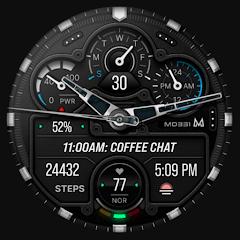
MD331 Analog watch face


Overview
MD331 Analog Watch Face is a premium wearable horology application developed by Matteo Dini MD Watch Faces. Engineered specifically for the modern Wear OS ecosystem utilizing Samsung's and Google's Watch Face Studio environment, the application targets smartwatches running API Level 33 and above, including Wear OS 4 and Wear OS 5 on devices such as the Samsung Galaxy Watch series and Google Pixel Watch families. The watch face is positioned within the technical luxury sports chronograph category, combining the aesthetic depth of mechanical horology with rich digital telemetry.
The architectural foundation of MD331 centers on Google's declarative Watch Face Format standards. Unlike legacy watch face engines that execute continuous background services—introducing CPU wake locks and variable battery drain—MD331 defines its visual structure, hand movements, sub-dial metrics, and color palettes entirely through declarative markup rendered directly by the Wear OS hardware compositor. This declarative approach minimizes runtime memory footprint, eliminates unnecessary CPU cycles, and produces a highly optimized Always-On Display (AOD) state that strictly limits active pixel-on ratios to protect OLED displays against burn-in.
From a functional standpoint, MD331 balances traditional timekeeping with information density. The analog dial incorporates classical hour, minute, and continuous sweeping second hands, framed by integrated digital displays for date, day of the week, and live biometric intervals. The interaction matrix includes four hardcoded system shortcuts mapped to Calendar, Alarms, Battery Status, and Heart Rate Measurement, ensuring core device utilities remain accessible with a single tap. In addition, the dial provides three open complication slots and three user-programmable application shortcut zones, allowing users to surface real-time external data feeds such as barometric pressure, weather forecasts, active caloric expenditure, and step tracking.
Aesthetic customization is managed directly on the smartwatch hardware. Through the native on-watch customizer, users can adjust individual color channels across outer bezels, chronograph sub-dials, mechanical watch hands, and typographical accents. This granular modularity allows users to adapt the watch face from a high-visibility tactical dial to an understated formal dress watch seamlessly.
Pros & Cons
Built natively on modern Watch Face Format standards, maximizing rendering efficiency and battery longevity.
Features a luxury analog chronograph design combining mechanical realism with digital metrics.
Provides on-watch aesthetic customization across bezels, hands, dial surfaces, and accent colors.
Integrates a comprehensive touch interface with four fixed system shortcuts and three customizable triggers.
Incorporates an optimized Always-On Display mode designed to prevent OLED burn-in.
Implements a clean commercial model free from advertisements, tracking SDKs, or recurring subscriptions.
- ✕
Customization via companion phone manager apps can lag on complex layouts, necessitating on-watch adjustment.
- ✕
Incompatible with older smartwatches running Wear OS 2.x/3.x or devices below API Level 33.
- ✕
Fixed typographical boundaries in sub-dial complication slots can truncate verbose weather descriptions.
Download
 Get it on Google Play
 Get it on App Store
FAQs
Why does the smartphone companion app occasionally fail to customize the watch face?
Complex declarative watch faces can exceed the memory rendering limits of the smartphone companion app; long-pressing the physical watch display to customize avoids this issue.
Is MD331 compatible with older Samsung Galaxy smartwatches running Tizen OS?
No. MD331 is engineered exclusively for modern Wear OS devices (API 33+) and cannot be installed on Tizen-based watches.
How does the watch face measure and display heart rate data?
Heart rate is queried through the wearable's native sensor provider, and tapping the heart rate dial triggers a direct manual measurement cycle.
Can the four preset system shortcuts be reassigned to other applications?
The four primary shortcuts are hardcoded to fundamental system utilities for stability, but three additional dedicated shortcut zones are provided for custom app assignment.
Does using the Always-On Display mode cause accelerated battery drain?
No. The AOD profile is engineered with a strictly constrained pixel-on ratio, drawing minimal power while preserving readability.
Hot Reviews
Summarized from Google Play reviews and community discussions.
Users consistently praise the high-fidelity rendering of the metallic bezels, realistic hand shadowing, and sub-dial textures that closely emulate luxury physical timepieces.
Feedback highlights the smooth second-hand sweep and rapid touch responsiveness when launching assigned system utilities.
User evaluations advise configuring color palettes and complications directly on the smartwatch screen to ensure immediate rendering without companion app synchronization delays.
Reviews emphasize the effective balance between visual elegance and data accessibility, noting that vital biometric and calendar metrics remain readable at a glance.