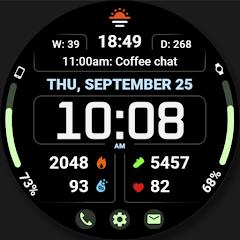
WFP 345 Informer watch face


Overview
The Wear OS wearable platform relies heavily on glanceable data delivery and thermal efficiency. Within this specialized design space, Alexandr Kovalev’s WFProduction studio has established a notable reputation for high-density, functional digital watch faces. The WFP 345 Informer watch face is an advanced digital chronometer interface engineered specifically for Wear OS smartwatches (such as the Samsung Galaxy Watch series, Google Pixel Watch, and TicWatch). Developed natively on the Samsung Watch Face Studio (WFS) environment and fully compliant with modern Wear OS Watch Face Format guidelines, WFP 345 focuses on delivering detailed biometric, environmental, and temporal data while preserving battery longevity.
The core design philosophy of WFP 345 centers on maximizing informational density without introducing visual clutter. The face features an 8-complication architecture, allowing users to monitor a broad telemetry array: heart rate, step progress, battery levels (both watch and connected phone), atmospheric pressure, UV index, sunrise/sunset times, and calendar events. The interface also includes three dedicated, invisible quick-access tap zones configured to launch essential apps—such as Samsung Health, alarms, or messaging—with a single touch.
A major functional feature is its dynamic dual-mode layout. Users can switch between a Complication-Centric Layout and an integrated 3-Day Weather Forecast Mode. In weather mode, standard central complication slots yield to a multi-day meteorological panel displaying minimum/maximum temperature ranges, weather condition icons, and precipitation expectations in Fahrenheit or Celsius. Underlying tap zones remain active even when visual complication graphics are suppressed, preserving functional access.
Aesthetic flexibility is supported by 30 distinct color themes, 4 digital typography styles, and multilingual date formats. To protect OLED panels and prevent unnecessary battery drain, WFP 345 features an optimized Always-On Display (AOD) mode. By keeping the on-pixel ratio (OPR) under safe operating limits and disabling high-frequency sensor updates while ambient mode is engaged, the watch face maintains power efficiency across long shifts.
Pros & Cons
Exceptional 8-slot complication architecture paired with 3 interactive quick-launch tap zones.
Innovative dual-mode display switching seamlessly between comprehensive complications and a 3-day weather forecast.
Broad aesthetic customizability offering 30 color presets and 4 distinct typography fonts.
Battery-optimized Always-On Display (AOD) engineered to minimize OLED on-pixel ratio and power consumption.
Built natively using modern Wear OS standards, ensuring broad hardware compatibility across Galaxy Watch and Pixel Watch devices.
- ✕
Weather mode hides underlying visual complication data while leaving tap zones active, which may confuse some users.
- ✕
Lacks an hourly weather breakdown option within the dedicated 3-day meteorological panel.
- ✕
Complex initial setup requires external helper apps for specific metrics like phone battery level.
Download
 Get it on Google Play
 Get it on App Store
FAQs
Why do complications disappear when activating Weather Forecast Mode?
The weather mode superimposes a multi-day forecast panel over the central complication area to preserve space. While the visual graphics are hidden, the underlying tap zones remain interactive for quick application launching.
How does WFP 345 preserve smartwatch battery runtime?
The watch face uses declarative Watch Face Studio optimizations that update data fields on-demand rather than running continuous background loop calculations, reducing battery drain in ambient AOD mode.
Is this watch face compatible with all Wear OS smartwatches?
It is compatible with all smartwatches running modern Wear OS versions (API level 28 and above), including the Samsung Galaxy Watch 4/5/6/7/Ultra, Google Pixel Watch 1/2/3, and modern TicWatch hardware.
How can phone battery percentages be displayed on this watch face?
Displaying connected smartphone battery levels requires pairing the watch face with standard third-party Wear OS phone battery complication provider utilities.
Hot Reviews
Summarized from Google Play reviews and community discussions.
The layout organizes extensive telemetry exceptionally well. The step progress bars, heart rate readouts, and custom complication docks remain sharp and readable even under bright sunlight.
The ability to switch from standard sensor metrics to a full three-day weather outlook is innovative and practical. However, an hourly weather view option would make the forecast panel even more useful.
Consistent with the developer’s catalog, the watch face performs smoothly without lag on Wear OS hardware, exhibiting minimal battery draw during typical 24-hour tracking routines.