
Hobnob - Invitation Card Maker

Overview
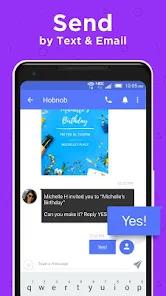
Hobnob represents a critical shift in the event management industry from email-centric platforms toward mobile-first, SMS-based invitation systems. Unlike traditional invite tools, which often get buried in promotional email folders, Hobnob leverages the high open rates of text messaging to ensure guest engagement. The application functions as an "all-in-one" hosting suite, allowing users to create professional-quality digital invitations, track RSVPs in real-time, and manage guest communications through a single dashboard.
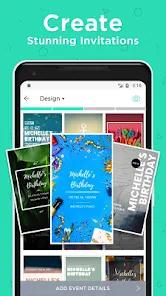
The feature breakdown for Hobnob highlights its "Smart Design" engine. The application provides thousands of templates for everything from weddings and baby showers to corporate events and holiday parties. A standout technical feature is the "Text Element Auto-Positioning," which automatically adjusts the layout of fonts and colors to match the user's event details, ensuring a polished look in seconds. For guests, the experience is designed to be entirely frictionless; they are never required to download the Hobnob app to RSVP, instead interacting with a custom-built mobile website that includes event directions and a guest list.
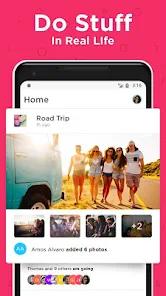
Insightful observations of Hobnob’s 2026 trajectory reveal its expansion into "Social Discovery." Beyond utility, the app now connects users with local communities and events around their city, transitioning from a private hosting tool into a social networking platform. However, this growth has brought challenges regarding its monetization model. While the design tools are free, users frequently report "hefty" fees to send invites via SMS to larger groups. Furthermore, technical discrepancies between the app and its web counterpart have been noted by users managing complex guest lists. Despite these frictions, Hobnob remains a top-rated choice for "Wedding Essentials" on Google Play, praised for its speed and aesthetic versatility.
Pros & Cons
The app’s text-based delivery system ensures significantly higher guest response rates compared to email, making it ideal for time-sensitive events.
Its automated hosting tools, such as the 24-hour "event reminder" with integrated Google Maps directions, remove the manual labor from guest management.
The "no-download" requirement for guests is a major strategic advantage, as it removes the barrier to entry that often prevents digital RSVP completion.
Design versatility is another strength, with templates that support custom background videos and photos, allowing for a high degree of personalization.
Additionally, the app’s community features allow users to discover and host public hangouts, broadening their local social circles.
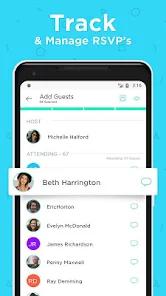
For organizers, the real-time RSVP notifications provide instant clarity on attendance numbers and guest preferences.
Finally, the app’s recognition by Google as a "Wedding Essential" highlights its professional-grade design quality for once-in-a-lifetime events.
- ✕
Monetization is a recurring point of user frustration, with reports of high costs (e.g., $48) for sending invitations to large guest lists, leading some to perceive the "free to download" label as misleading.
- ✕
Some users have reported that while the initial invite is web-based, follow-up messages sometimes prompt guests to download the app, which can be viewed as "terrible" UX for a paid service.
- ✕
Additionally, the template editor can be difficult to use for precise adjustments like font size or color on the mobile interface.
Download
 Get it on Google Play
  Get it on App Store
 FAQs
Will my guests be forced to download the Hobnob app to respond?
No, Hobnob creates a custom event website that guests can access via a link in their text message to RSVP and see details.
Can I use Hobnob to send invitations via social media?
Yes, the app allows you to share your unique invite link through Instagram, Snapchat, and WhatsApp.
What happens if a guest doesn't respond to my first text?
The app can be configured to send automatic RSVP reminders to "non-responders" after a few days.
Is it possible to import my contacts from a spreadsheet?
Yes, the app supports CSV and Excel file uploads, though some users have reported occasional formatting errors during this process.
Does Hobnob work for international events?
Yes, though the SMS delivery features are primarily optimized for North American phone numbers; international guests may prefer the email option.
Hot Reviews
Hosts frequently mention that they were able to create and send a "stunning" invitation in under five minutes. The ability to use video backgrounds is a standout feature for birthday and bachelor party planning.
A common complaint on the Play Store involves the cost of sending SMS invites to large groups. Reviewers have noted that they were surprised by fees after spending time designing their cards, calling for more transparent pricing.
Long-term users praise the "automatic reminder" feature, noting that it significantly increased their event attendance by "nudging" people who had forgotten to respond or check their messages.