
e-Sword: Bible Study to Go
Overview
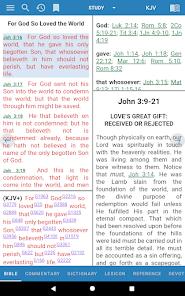
E-Sword is the Android implementation of Rick Meyers’ iconic Bible study software, which has been a staple of theological research on the PC for over two decades. Unlike many religious applications that are designed for casual reading or daily devotionals, e-Sword is a "scholarly library" intended for deep exegesis and word studies. The application’s primary value proposition is the massive quantity of scholarly resources—Bibles, commentaries, dictionaries, and lexicons—that are provided for free or for a one-time nominal fee.
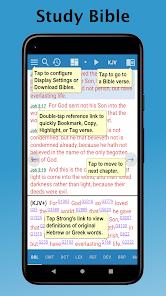
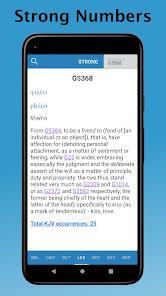
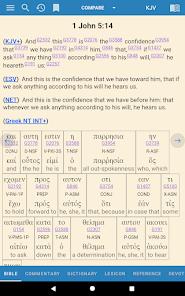
From a technical perspective, the most powerful feature of e-Sword is its integration of Strong’s Numbers. This indexing system allows users to tap on a word in the English text (like the KJV) and instantly see the original Greek or Hebrew lemma, its definition, and its usage throughout the scriptures. The app also supports parallel Bible viewing, where multiple translations can be compared side-by-side to identify nuances in translation.
Insightfully, e-Sword respects the user’s existing investment; those who have purchased premium modules (like the NASB or specialized commentaries) for the PC version do not need to repurchase them for the Android app. The app operates entirely offline once the modules are downloaded, ensuring that students and pastors can conduct research in environments without internet access. Technical tools like notation (built-in editor), highlighting, and tagging allow the user to maintain a digital study journal that syncs with their research.
However, the transition to mobile has not been without criticism. Some users find the interface to be "functional but dated," particularly when compared to the highly polished UI of competitors. There are also reported limitations in the audio narration feature, such as the lack of a tracking bar to indicate which verse is currently being read. Despite these minor UX flaws, e-Sword remains the "best-in-class" choice for users who prioritize depth and scholar-grade tools over aesthetic polish.
Pros & Cons
The application provides access to an immense library of free historical and theological texts that are often locked behind high paywalls in other applications.
Integration of Strong’s Numbers and lexicons allows for professional-level Greek and Hebrew word studies directly from the English text.
Completely ad-free and designed for offline use, ensuring that study sessions are never interrupted by connectivity issues or intrusive marketing.
Users who have already invested in premium modules for the PC version of e-Sword can utilize them on the Android app without additional cost.
Support for third-party module imports (e.g.,.cmti,.bbli) allows for high extensibility, enabling users to add niche scholarly works to their library.
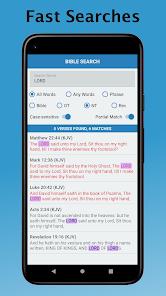
Fast and efficient search capabilities allow for near-instant retrieval of themes or verses across multiple translations and commentaries.
- ✕
The user interface has been described as "less intuitive" than modern devotional apps, requiring a period of learning to master the navigation between lexicons and Bibles.
- ✕
Audio narration lacks a visual tracking bar, making it difficult for users to follow along with the text during dramatic readings.
- ✕
Limitations in verse selection make it difficult to copy non-consecutive verses or perform batch exports for external study notes.
Download
 Get it on Google Play
  Get it on App Store
 FAQs
How much does e-Sword cost for Android?
The app typically has a one-time cost of $2.99, which provides access to the full feature set and free library.
Can I use it offline?
Yes, all Bibles and reference materials are downloaded to the device for completely offline access.
What are Strong's Numbers?
They are a numerical system that links English words to their original Greek and Hebrew meanings in the dictionary.
Can I write my own notes in the app?
Yes, e-Sword includes a built-in editor for personal notes and study journals that can be tagged to specific verses.
Does it support multiple languages?
Yes, the app offers Bibles and resources in over 70 different languages.
Can I use my PC version modules?
Yes, the app allows for the activation of premium modules purchased for the Windows version.
Hot Reviews
Pastors and teachers have praised e-Sword for its "lightning fast" search and organized resource management. The ability to carry a massive theological library in one's pocket is cited as a game-changer for ministry.
Users are frequently impressed by the lack of intrusive ads and the sheer volume of free material provided, contrasting it favorably with "launcher" style apps that charge for basic versions.
Some long-term users of the PC version have expressed disappointment with the mobile interface's "clunkiness" and have reported a lack of responsive communication from the developer when seeking help.