Color Widgets, Theme: iWidgets
The one-click theme system is the good idea here, and the free tier charges for it in attention: our con list records an experience heavily dependent on video advertising, and published feedback describes sitting through over a minute of it to click a single link or try an icon pack. Two more things belong in the decision — three system permissions (location, storage and accessibility) tied to the weather, photo and Control Center features, and photo widgets that some users report losing their assigned images.
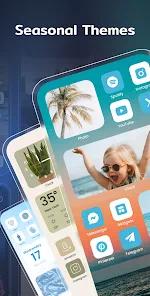
- People who want a complete, curated home screen without assembling it piece by piece — themes bundle a matching icon pack, wallpaper and widget styles and apply together, in recorded styles including anime, neon, minimalist and 'human-centric'
- Tinkerers who want control after the theme lands — fonts, background colours and image assets are editable on each individual widget, against a recorded library of 14,000+ themes and wallpapers updated daily with community-crafted designs
- Anyone who wants date-driven and photo-driven widgets: Event Timers and Days Counters for milestones and deadlines, plus Photo Slideshow widgets cycling through your own gallery
- Phone and tablet owners who want one status square instead of a trip into Settings — the X-Panel shows battery, storage, memory and Wi-Fi/Bluetooth in a single block, and our records note the app is optimized for both phones and tablets
- Users who would rather pay than watch — the FAQ records a Pro upgrade, as a subscription or a one-time fee, that removes ads and unlocks premium content
- Anyone who would rather not grant accessibility access to a personalization app — our source material records the AccessibilityService API as required for the Control Center, so the X-Panel is off the table without it
- People who do not want a home-screen app holding location access — our con list records constant location access, which the FAQ ties to the Weather Widget's real-time data and the 'Distance Widget'
- Anyone with a low tolerance for video advertising on a free tier — unlocking premium 'coins' or specific icon packs runs through short videos, and published feedback describes over a minute of ads to open a single link or try an icon pack
- Users whose main reason for installing would be photo widgets specifically — some users report them losing their assigned images and reverting to a 'tap to add' state
- People who want their manufacturer's own interface refined rather than replaced — our source material records the aim as porting the visual language of the iOS 17 interface onto Android




Overview
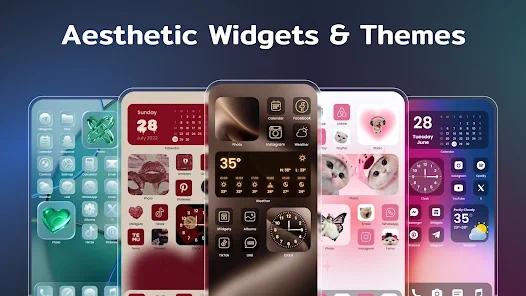
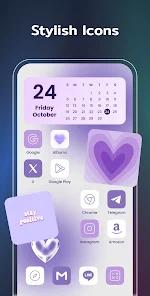
The best idea in this app is the one-click theme, and nearly everything else it offers exists to feed it. Our source material records “aesthetic themes” that bundle a matching icon pack, wallpaper and widget styles and apply them in a single action, in styles it names as anime, neon, minimalist and “human-centric” — the difference between admiring a curated home screen in a screenshot and having one on your own phone. The stated purpose, per our own database entry, is to port the visual language of the iOS 17 interface to Android, and our pro list credits the app with enabling a polished, iOS-like look on any Android device regardless of the manufacturer’s native UI. Two conditions come attached — the ad load and the permissions — and both deserve a careful read.
The widget library, and how much of it you can change
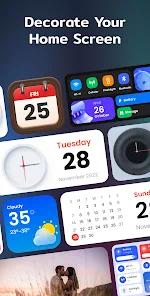
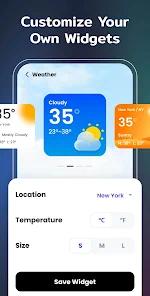
Our records describe a broad widget catalogue: analog and digital clocks, battery monitors, world clocks and motivational quotes, alongside the photo and system widgets below. What lifts that above a picture gallery is the editing: our pro list records creative freedom at the individual widget level, with fonts, background colours and image assets modifiable per widget, so a theme is a starting point rather than a sealed package.
The other half of the appeal is how little work it asks: our records credit simple, one-click installation for many widgets and icon packs, which is what makes it usable by people who will never install a third-party launcher. The FAQ adds a useful icon detail — themed icons can be saved to the device and applied through shortcuts or the app’s own internal setup tool. The library behind it is large — our pro list records 14,000+ themes and wallpapers, updated daily with community-crafted designs — and our records note the app is optimized to run efficiently on both smartphones and tablets.
The X-Panel does an actual job
Most of this app is decoration, and that is the point. The X-Panel is the exception. Our source material describes it as a consolidated system dashboard showing Bluetooth status, Wi-Fi connectivity, battery level and internal storage in real time in one cohesive block, and the FAQ, which calls it a shortcut collection, adds memory to that list. On a home screen otherwise given over to clocks and quotes, the one square that answers “how much storage is left, and is Bluetooth on” is the widget likeliest to survive the novelty period. It is also the feature with the steepest access requirement.
Timers, counters and a gallery that moves
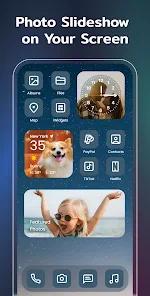
Three more functional pieces are recorded. Event Timers count down to a date that matters, Days Counters track the distance from one, and our pro list frames the pair as practical utility for milestones and deadlines. Photo Slideshow widgets cycle through images from your own gallery, the cheapest way to stop a static home screen looking static. Setting up a custom photo widget works as the FAQ describes: grant storage permission, pick a photo widget style inside the app, choose an image from the camera roll, then place the widget.
Three permissions worth understanding
This app asks for more system access than its category might lead you to expect, and anyone weighing an install deserves all three up front, with the purpose our records attach to each.
Location. Our con list records constant location access among the app’s requirements. The FAQ gives the reason: the Weather Widget needs it for accurate real-time data, and the “Distance Widget” uses it to calculate proximities.
Storage. The FAQ records storage permission as what makes custom photo widgets possible — it is how the app reaches the camera roll for the image you pick.
Accessibility. Our source material records the AccessibilityService API as required for the app’s Control Center — the X-Panel above, which the FAQ says surfaces real-time battery, storage, memory and connectivity status. Accessibility is a broad permission, and granting it to any app is a decision worth making deliberately rather than approving on the way to a new wallpaper.
Our own con list flags these permissions as ones that may raise privacy concerns. For the current picture of what the shipping build collects and shares, the Data safety section of the app’s Play listing is the place to look, since it is maintained against the live version. Each request arrives attached to a named feature, and all three of those features are optional. The grants are not optional if you want them, though, which is why they belong together on one page rather than arriving one at a time in the middle of setup.
What the free tier costs in attention
The monetization is the loudest thing about the free experience, and it should be said plainly. Our con list records a heavily ad-supported free tier requiring users to watch numerous videos to unlock or configure free items, and our source material records the mechanism: short video advertisements to earn premium “coins” or to unlock particular icon packs. Published user feedback is blunter about how that feels — one review describes sitting through over a minute of advertising just to click a single link or try a new icon pack, and calls the frequency a major deterrent.
Our records carry the other side too. Another published review describes the layout as straightforward and the customizability as impressive, and calls the ad load a fair tradeoff for a premium-looking home screen at no cost. Both are true at once: the interruptions are frequent, and they are what makes a 14,000-item library free to use.
There is an exit. The FAQ records a Pro upgrade, as a subscription or a one-time fee, that removes all ads and unlocks premium content. No price is recorded in our material for either option, so the live Play listing is the authority on what Pro costs today.
The photo widgets that do not always hold
The one recorded functional defect is specific. Our con list records that some users report technical glitches in which photo widgets lose their assigned images and revert to a “tap to add” state. Published feedback puts it more concretely: widgets that reset on the home screen and need constant maintenance to keep the pictures visible, from a reviewer who says the app would be close to perfect without it.
Scope matters: this is recorded as something some users hit, not a fault every install shows. But it is the failure mode likeliest to undercut the app’s own pitch, since a home screen assembled for its looks is poorly served by a panel that periodically goes blank. If photo widgets are your specific reason for installing, treat it as a known risk.
Reading the store numbers
A 4.6 average across 430,156 ratings, behind a 10M+ install count, is a lot of signal, and it is worth being clear about what an aggregate that size settles and what it leaves open. It says the app works for a very large number of people. It does not say whether you will be one of the users whose photo widgets reset, or how the ad load will feel on day three — and both of those sit in our records as recorded complaints rather than hypotheticals. The aggregate and the complaints are both real, and the second does not disappear into the first.
Who it’s not for
If you would rather not grant accessibility access to a personalization app, the X-Panel is out of reach and a real part of the appeal goes with it. If constant location access for a home-screen decorator is not a trade you want, the weather and distance widgets are similarly off the menu. If video advertising wears on you quickly, the free tier will too, and the Pro upgrade is better treated as the entry price than an optional extra. If photo widgets are your main reason for installing, the reset some users report lands directly on that use case. And if you want your manufacturer’s own interface refined rather than replaced, this app is built for the opposite instinct.
Our take
We score this 4.6, level with its store rating.
What the app delivers is real: a recorded library of 14,000+ themes and wallpapers, a theme system that lands in one action, per-widget control over fonts, colours and image assets, and a system dashboard that earns its square on the grid. What it asks in return is real too, and all three items belong in the decision. The free tier runs on video advertising heavy enough that published feedback calls the frequency a major deterrent and describes over a minute of it to click a single link. Three system permissions — location, storage and accessibility — come attached to the weather, photo and X-Panel features. And photo widgets, one of the headline draws, are reported by some users to drop their assigned images and revert to a “tap to add” state.
None of those is hidden, and none of them is trivial. If a coherent, polished home screen is what you are after, and the Pro upgrade is a price you would rather pay than the attention, this is a strong pick. If the permissions give you pause, or photo widgets are the specific reason you were going to install, those are honest reasons to pass.
How We Evaluate
We assess every app against the same checklist: what it delivers versus what it promises, how honest the pitch is, where real users hit friction, and who should look elsewhere. We did NOT hands-on test this app — we did not install it, grant it any permission, apply a theme, build a photo widget, or sit through a single unlock video, and nothing here is a measurement of ours. This assessment is grounded in our own database entry for the app, which is the source for the iOS 17 framing, the X-Panel, the one-click theme system and the ad-supported unlock loop; our recorded pro and con lists; the app's FAQ, which is where the stated purposes of the location, storage and accessibility permissions come from, along with the Pro upgrade being offered as a subscription or a one-time fee; published user feedback; and the store signals — a 4.6 rating across 430,156 ratings, 10M+ downloads, 8 screenshots, the Lifestyle category, and developer AI Photo Team. One limit is worth naming: our material carries no Play update date for this app. We also attach no star rating to any user feedback we quote, because the star labels we hold do not track the sentiment of the text beside them. Our vantage point is a disclosure about our method, not a deduction against the app.
Pros & Cons
Integrated "Event Timers" and "Days Counters" add practical utility for tracking milestones and deadlines.
Offers a massive library of 14,000+ themes and wallpapers, updated daily with community-crafted designs.
Simple, one-click installation for many widgets and icon packs makes personalization accessible to non-technical users.
The application is optimized to work efficiently on both smartphones and tablets, including Mac with M1 chips (iOS version).
Enables a highly polished, iOS-like aesthetic on any Android device, regardless of the manufacturer's native UI.
The "X-Panel" widget provides a powerful, all-in-one system diagnostic dashboard directly on the home screen.
High levels of creative freedom allow users to modify fonts, background colors, and image assets for every individual widget.
- ✕
The free experience is heavily ad-supported, requiring users to watch numerous videos to unlock or configure free items.
- ✕
Some users report technical glitches where photo widgets lose their assigned images, reverting to a "tap to add" state.
- ✕
Requires several invasive permissions, including constant location access and accessibility services, which may raise privacy concerns.
Download
 Get it on Google Play
  Get it on App Store
 FAQs
How do I set up a custom photo widget?
Users must grant storage permission, select a photo widget style within the app, choose an image from their camera roll, and then place the widget on their home screen.
Why is location permission required for the app?
This is necessary for the Weather Widget to provide accurate real-time data and for the "Distance Widget" to calculate proximities.
Is there a way to use the app without advertisements?
Yes, users can upgrade to a Pro version via subscription or a one-time fee to remove all ads and unlock premium content.
Can I change my app icons without using a launcher?
The app provides a direct way to save themed icons to your device, which can then be applied via shortcuts or the app's internal setup tool.
What is the "X-Panel" used for?
It is a shortcut collection that displays real-time status for battery, storage, memory, and connectivity (Wi-Fi/Bluetooth) in one place.
Hot Reviews
The layout of the app is incredibly straightforward, and the level of customizability is impressive. While there are a lot of ads, the ability to get a premium-looking home screen for free is a fair tradeoff.
The frequency of advertisements is a major deterrent. Some users find that they have to sit through over a minute of ads just to click a single link or try a new icon pack, which ruins the creative flow.
A common complaint is that photo widgets frequently "reset" on the home screen, requiring constant maintenance to keep images visible. If this bug were fixed, the app would be nearly perfect.