
Ring - Always Home
Ring's app is polished and easy to live with, and its Alexa integration and Neighbors feed are genuine strengths. Saving or reviewing footage requires a paid Ring Protect plan, and owners report that alerts and live view sometimes lag behind events, so it suits Alexa households ready to budget for a subscription.
- Alexa households that want doorbell and camera feeds on Echo Show or Fire TV screens
- Renters and DIY installers who want battery-powered devices with guided, step-by-step setup in the app
- People who value neighborhood awareness and want local safety alerts alongside their own cameras
- Owners already planning on Ring Protect who want doorbell, cameras, and alarm in one app
- Anyone who wants saved footage without a recurring fee, since recordings and event history require Ring Protect
- People who need reliably instant alerts; owners report push notifications arriving up to two minutes late
- Households that want local recording that keeps working during an internet or cloud outage
- Privacy-first buyers uneasy about a cloud-based, Amazon-owned system with a community alert feed



Overview
Ring’s app is the strongest argument for Ring hardware, and also the place where Ring’s biggest trade-off, the subscription, becomes hard to ignore. It is polished, approachable to set up, and woven into Amazon’s world in ways few competitors match: your doorbell on an Echo Show, a camera feed on Fire TV, and a neighborhood safety feed many owners call their favorite feature. But the app’s most useful capability, looking back at what happened while you weren’t watching, sits behind a Ring Protect subscription, and owners consistently report that live view and motion alerts can lag behind the moment they’re meant to capture. Go in planning to pay for a plan and treating it as a strong but imperfect alert system, and it’s one of the easiest home-security apps to live with.
What Ring does well
Setup is a real strength. For battery-powered doorbells and cameras, the app walks you through installation with guided, step-by-step video instructions, which makes Ring a sensible choice for renters and first-time DIY installers.
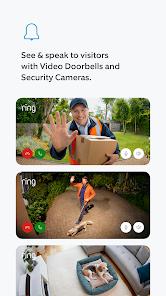
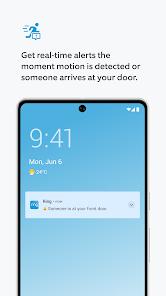
Once a device is live, the core loop is simple. A doorbell press or motion event triggers an alert, and tapping it opens a live HD or 2K feed, depending on the model, with Two-Way Talk. Noise cancellation makes it easier to talk to a delivery driver over traffic or wind, which matters more day to day than most spec-sheet features.
The Alexa integration is the standout. You can ask an Echo Show or Fire TV to bring up a camera feed by voice, and Echo speakers can announce when someone presses the doorbell. If your home already runs on Alexa, few doorbell ecosystems fit in as naturally.
Shared access is handled sensibly too. You can give family members or a tenant their own guest access with limited permissions, so nobody needs the account password.
The subscription question
This is the one thing to settle before buying any Ring device. Without a Ring Protect plan, the app does two things: it shows live video and it sends real-time alerts. You cannot save a clip, scroll back through the day’s events, or share footage of something you missed. If a package disappears while you’re in a meeting and you didn’t open the alert in time, there’s nothing to review afterward.
With a plan, the app becomes the product Ring advertises: an event history you can scrub through, and clips you can download and share. Ring Alarm owners can also add professional monitoring with 24/7 emergency dispatch. Plans come in tiers, so price out the one that covers every device you expect to own, not just the first doorbell.
Pricing is where owner sentiment has shifted most. Owners frequently point to rising plan prices, and a common 2026 theme is that the subscription now feels like a standing cost of owning the hardware rather than an optional extra. We’d treat Ring Protect as part of the purchase price. If you aren’t prepared to pay it for as long as you own the devices, a Ring camera works mainly as a live-view doorbell and alert system.
Walking through the app
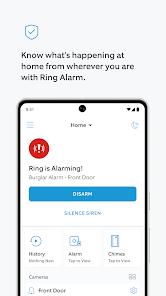
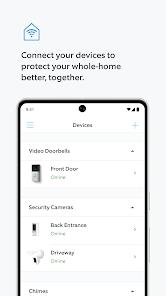
The main screen brings your devices together, and Ring Alarm owners arm and disarm the system from the same app, so doorbell, cameras, sensors, and smart lighting live under one roof.
Motion Zones are the setting most worth your time. You can draw zones that exclude a busy street, a neighbor’s driveway, or a tree that sways in the wind, and well-drawn zones help cut down false alerts. Paired with the Motion Frequency settings, they also help with battery life. The standard advice for battery drain is to dial back motion frequency and disable Live View background tasks, which helps both the camera and your phone.
Bird’s Eye View appears on higher-end models and uses radar to plot a visitor’s path across an aerial map of your property, showing whether someone walked straight to the door or cut across the yard. It’s tied to specific hardware, so many owners won’t have it.
Recording is event-based on most devices. Battery-powered models generally don’t offer 24/7 continuous recording, to avoid overheating and battery drain, so check the specific model if you want a constant timeline.
Control Center is the privacy hub. It’s where you manage data sharing and turn on end-to-end encryption, so only authorized devices can view footage. Encryption comes with trade-offs: some conveniences, including viewing on Alexa devices, aren’t available while it’s on, so Alexa-centric households should check what changes before enabling it. For privacy-minded owners it’s a welcome option, but it’s something you switch on rather than the default.
How it holds up day to day
Three things shape how owners feel about the app over time.
The first is positive: Neighbors is the feature many owners value most. People describe it as the way they hear about lost dogs, package thefts, and local incidents nearby, with posts from neighbors alongside alerts from local public agencies. For many households, it keeps the app useful even on days when nothing happens at their own door.
The second is the subscription cost, covered above. The third, and the most practical, is live view reliability. A recurring complaint is the loading spinner when opening a live feed from an alert: by the time the video connects, the visitor has sometimes already left. Combined with reports of push notifications arriving up to two minutes after a motion event, this is the gap between the real-time pitch and what some owners experience. It doesn’t affect everyone, and Wi-Fi signal strength at the device often plays a part, but it shows up often enough in feedback that you should expect it occasionally.
Where it frustrates
Beyond the latency, the main limitations are structural rather than bugs.
Cloud dependency is the biggest. Ring’s live view, alerts, and history all run through Amazon’s cloud, so if your home internet drops or there’s a regional service outage, the app’s ability to show you what your cameras see is limited until the connection returns. For a doorbell that’s an inconvenience; for a home security system, it’s a real consideration.
Lock-in is the quieter one. Ring devices are set up and managed through Ring’s own app, and your clip history and plan don’t carry over to another brand. Once you own a doorbell, a few cameras, and an alarm kit, switching is expensive, so settle the subscription question up front.
Alert volume can also be an issue on busy properties. Without tuned Motion Zones, a camera facing a street can send a steady stream of notifications.
Privacy and Neighbors
End-to-end encryption and Control Center give owners real say over who sees their footage. Still, Neighbors has drawn public debate over privacy and over how community footage is shared with local agencies. You can use the app without posting to Neighbors, and data-sharing choices are adjustable. If a cloud-based, Amazon-owned camera network doesn’t suit your household regardless of settings, that’s a reasonable reason to look elsewhere.
How it compares
Against Google Nest, the choice usually follows your smart-home platform: Nest fits Google Home households the way Ring fits Alexa ones, and Nest also reserves fuller event history for a paid plan. Eufy centers its pitch on local storage without a mandatory monthly fee, which directly addresses Ring’s most common complaint, though you give up Ring’s built-in Neighbors feed. Arlo and Wyze also put fuller recording features behind paid plans, so Ring isn’t unusual in charging; the question is whether its ecosystem is worth the cost to you. For alarm-first buyers, Ring Alarm competes with dedicated systems like SimpliSafe, where professional monitoring is likewise a paid service.
Where it stands in 2026
The app now controls doorbells, cameras, alarm sensors, and smart lighting, with 2K video, Bird’s Eye View, and encryption controls added along the way. A 4.6 rating across more than 455,000 Play ratings suggests most owners are satisfied day to day; the pressure points in current feedback are plan pricing and alert speed.
Who it’s not for
Ring isn’t the right fit if you want recorded footage without a recurring fee, need alerts that arrive instantly every time, or want local recording that continues when the internet goes down. It’s also a harder sell outside the Alexa ecosystem, where its best integration goes unused, and for buyers who would rather keep video off a large company’s cloud entirely.
The verdict
For an Alexa household that’s comfortable with a subscription, Ring’s app is easy to recommend: setup is approachable, Two-Way Talk copes well with outdoor noise, Motion Zones and shared access are well thought out, and Neighbors adds local awareness few competitors match. The caveats land on the moments a security app exists for, since history sits behind the paywall and alerts can trail events. Budget for Ring Protect, tune your Motion Zones, and keep realistic expectations about speed.
How We Evaluate
This review draws on Ring's store listing and feature descriptions, common owner questions about subscriptions, battery life, recording, and encryption, the app's 4.6 rating across more than 455,000 Google Play ratings, recurring themes in owner feedback from Play reviews and community discussions, and Ring's widely reported public record on subscriptions and privacy. We haven't tested Ring hardware hands-on, so latency and reliability points reflect what owners consistently report.
Pros & Cons
Seamless integration with Amazon Alexa allows for "Voice Command" viewing of camera feeds on Echo Show and Fire TV devices.
The "Neighbors" feature provides an unparalleled layer of local community safety, allowing users to receive and share alerts about local crimes and incidents.
Hardware installation for battery-powered devices is exceptionally user-friendly, with the app providing guided, step-by-step video instructions.
"Two-Way Talk" includes advanced noise cancellation, making it easy to communicate with delivery drivers or visitors even in noisy outdoor environments.
The app supports "Professional Monitoring" for the Ring Alarm system, providing peace of mind with 24/7 emergency dispatch options.
"Motion Zones" can be highly customized within the app to reduce false alerts from busy streets or swaying trees.
Shared access features allow homeowners to grant limited "Guest" permissions to family members or tenants without sharing account credentials.
- ✕
Core functionality, such as video storage and historical event review, is strictly locked behind a monthly or annual subscription.
- ✕
The app has been reported to experience significant notification delays, which can result in users missing the arrival of a visitor or a package theft.
- ✕
Dependency on Amazon's cloud infrastructure means that local home security is compromised if there is a regional internet or server outage.
Download


FAQs
Can I use Ring cameras without a subscription?
Yes, but you will only be able to view live video and receive real-time alerts. You cannot save or review any footage of events that you missed.
What is the "Neighbors" feature?
It is a social safety network within the app where you can see safety alerts from your neighbors and local public agencies.
How do I prevent the app from draining my battery?
Users can adjust the "Motion Frequency" settings and disable "Live View" background tasks to optimize the battery life of their cameras and mobile device.
Does Ring support 24/7 continuous recording?
Most Ring devices are event-based. Continuous recording is typically not available for battery-powered models to prevent overheating and battery drain.
Is my video data encrypted?
Yes, Ring supports end-to-end encryption for video, which can be enabled in the "Control Center" to ensure only authorized devices can view the footage.
Hot Reviews
Summarized from Google Play reviews and community discussions.
Many users highlight the "Neighbors" app as their favorite feature, noting that it has helped them stay informed about everything from lost dogs to package thieves in their immediate area.
A common point of contention in 2026 is the rising cost of the Ring Protect plan, with many users feeling that the app has become a "recurring tax" for home security.
Reviewers have frequently complained about the "spinning wheel" when trying to load a live feed, often resulting in the visitor being long gone by the time the video connects.