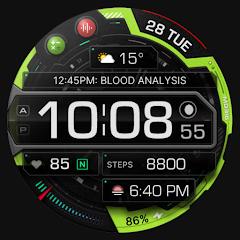
MD316 Digital Watch Face


Overview
The wearable software ecosystem has undergone an architectural transformation, migrating from imperative runtime execution toward Google’s declarative Watch Face Format (WFF). Developed under the Matteo Dini MD brand, MD316 Digital Watch Face represents a prominent implementation of high-density digital watch face engineering for Wear OS devices operating on API Level 33 and above, encompassing Samsung Galaxy Watch 4 through contemporary generations, Galaxy Watch Ultra, and Google Pixel Watch hardware. The application departs from purely skeuomorphic analog reproductions, establishing a layered, three-dimensional digital interface designed to balance system overhead against real-time sensor polling.
At the architectural core of MD316 is a modular telemetry grid configured to deliver continuous situational awareness. The primary visual surface integrates a high-contrast time matrix supporting both 12-hour and 24-hour phone-synchronized formats, dynamic day and date scheduling fields, battery level metrics with interchangeable visual styles, and real-time heart rate monitoring. Furthermore, the watch face incorporates an adaptable step tracking module that links directly to onboard sensor pipelines, rendering movement progress through visual gauges.
The application expands user control through four user-assignable complication slots and five interactive application shortcuts. Three shortcuts are preconfigured to system essentials—Calendar, Battery status, and Heart Rate measurement—while two auxiliary slots remain open for arbitrary application targeting. Customization extends across multiple visual layers, including selectable background textures, sweep-second hand configurations, battery graphic styling, and independent color palettes for temporal digits and data indicators.
In contrast to minimal watch faces, MD316 relies on structural depth and micro-shadowing to maintain clear separation between complication slots. This structural density introduces a platform-specific nuance: the Samsung Galaxy Wearable smartphone companion application occasionally encounters buffer limits when rendering the complex configuration layout, requiring users to perform visual and complication adjustments directly on the smartwatch touchscreen. This behavior stems from parsing limitations within vendor companion engines rather than runtime faults in the underlying WFF schema. MD316 remains a solid, data-centric interface for technical users demanding immediate wrist-top metric visualization.
Pros & Cons
Delivers high information density through four customizable complication zones and five application shortcuts.
Features a dimensional 3D design that enhances sunlight readability across dense telemetry arrays.
Implements an optimized Always-On Display profile engineered to reduce AMOLED burn-in risks.
Offers independent customization pipelines for backgrounds, time digits, battery styles, and accent colors.
Utilizes the declarative Watch Face Format to eliminate background executable loops and conserve battery life.
- ✕
Complex multi-layered visual elements can cause render stalls in the mobile Samsung Galaxy Wearable editor.
- ✕
Lacks backward compatibility with legacy smartwatches running Wear OS 2.x or Samsung Tizen.
- ✕
Certain high-contrast color choices can obscure the sweep-second indicator against dark textured backgrounds.
Download
 Get it on Google Play
 Get it on App Store
FAQs
Why does the smartphone companion app fail to load the watch face editor?
Complex multi-layered layouts can exceed the real-time parsing buffers of the mobile companion application. Users should customize the watch face directly on the smartwatch hardware by long-pressing the display and selecting the customize icon.
Does MD316 support real-time biometric tracking?
The interface links directly to onboard hardware biometric sensors via standard Wear OS Health Services, updating readings according to system intervals or via immediate manual polling when tapping the dedicated heart rate shortcut.
Are older smartwatches running Tizen supported by this watch face?
No. The application is built strictly for Wear OS devices operating on API Level 33 or higher, which includes Galaxy Watch 4 series and newer, as well as modern Pixel Watch devices.
How does the Always-On Display profile protect against screen burn-in?
The Always-On Display profile restricts active pixel luminance, lowers the overall On-Pixel Ratio (OPR), and strips non-essential graphic assets, conforming to standard Wear OS pixel-shifting anti-burn-in protocols.
Can preconfigured system shortcuts be assigned to third-party applications?
The watch face provides three preset system triggers (Calendar, Battery, Heart Rate) alongside two additional, distinct shortcut slots that can launch any user-selected third-party application.
Hot Reviews
Summarized from Google Play reviews and community discussions.
Users praise the layered three-dimensional aesthetics and appreciate the four complication slots that clearly render weather, UV, and pressure metrics alongside timekeeping indicators.
Technical feedback notes that while mobile companion app editing can stall, direct hardware-based customization on the watch touchscreen works reliably and provides full access to all styling options.
Reviewers value the bold numeric clarity of the clock face, though some note that the sweeping second hand can blend into textured backdrops under low-contrast palette choices.
Users highlight the wide selection of primary and secondary accent colors, noting that the vibrant tones enhance quick readability during athletic and outdoor activities.