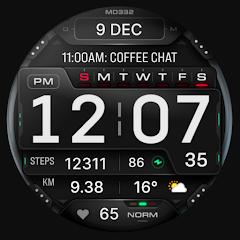
MD332 Digital watch face


Overview
The MD332 Digital Watch Face, produced by Matteo Dini MD ® Watch Faces, is an information-dense digital watch face built for Wear OS API Level 33+ devices (Wear OS 4 and newer). Engineered for hardware like the Samsung Galaxy Watch series and Google Pixel Watch lines, the software is written natively for Google's declarative Watch Face Format (WFF). This framework delegates display rendering directly to the operating system's display compositor, reducing background battery draw and memory utilization.
MD332 is designed around bold, oversized digital typography to provide glanceable time and fitness metrics during active workouts or bright outdoor conditions. The primary display features large digital numerals, flanked by date metrics, heart rate interval zones, and a battery level bar. The interactive framework incorporates three preset application shortcuts (Calendar, Battery, and Heart Rate Measurement), four user-definable custom app shortcuts, and four external complication slots capable of ingesting external data feeds like weather conditions, walked distance, calories burned, UV index, and barometric pressure.
The customization engine allows independent styling for time digits, date displays, seconds readouts, and background visual elements. Subtle background animations provide live state feedback, and can be disabled within the color settings to optimize battery life. The Always-On Display (AOD) mode supports both Minimal and Full profiles designed to prevent AMOLED burn-in while maintaining readability. Due to known limitations in the Samsung Galaxy Wearable phone app when processing complex WFF manifests, customization is best handled directly on the smartwatch using touch-and-hold gestures.
Pros & Cons
Large, high-contrast digital typography provides clear readability in bright outdoor environments.
Built on the native Watch Face Format, ensuring smooth performance and minimal battery draw.
Robust telemetry options with four modular complication sockets and seven total app launch triggers.
Extensive color styling across primary digits, accent bars, and background elements.
Flexible Always-On Display settings provide low-OPR profiles that help protect AMOLED displays.
Supports both 12-hour and 24-hour time formatting automatically based on connected phone settings.
- ✕
Customization via the Samsung Galaxy Wearable smartphone app can stall, requiring on-watch configuration.
- ✕
The top-positioned system notification dot can occasionally overlap with upper health metrics like heart rate.
- ✕
Advanced health metrics (such as active calories or distance) require separate complication provider apps.
Download
 Get it on Google Play
 Get it on App Store
FAQs
What smartwatches are compatible with the MD332 Digital Watch Face?
MD332 supports all smartwatches running Wear OS API Level 33 or higher (Wear OS 4 and later), such as the Samsung Galaxy Watch 4 through 8/Ultra and Google Pixel Watch lines.
How can MD332 be customized if the phone companion app fails to load?
Touch and hold the watch screen directly, swipe to MD332, and tap the "Customize" button at the bottom of the display.
Can the background visual animations be turned off?
Yes; cycling to the final background option in the on-watch customization menu disables the background animation.
Why do some complication slots show dashes instead of metrics?
Complications rely on external apps; users must ensure the corresponding health or weather applications are installed and configured to share data.
Does MD332 impact daily smartwatch battery life?
When using standard settings and the Minimal AOD profile, the watch face's WFF architecture operates with very low battery consumption.
Hot Reviews
Summarized from Google Play reviews and community discussions.
Users frequently praise the oversized time digits, noting that they make checking the time effortless during workouts or while driving.
Feedback confirms that the Watch Face Format architecture keeps battery drain low throughout the day, even with multiple complications active.
While phone-side editing can hang due to companion app bugs, users find direct on-wrist setup fast and stable.
Users value having seven shortcuts and four complications on one screen, though some note that the notification dot can overlap upper data fields.