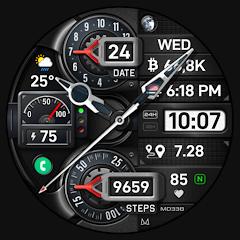
MD338 Hybrid watch face


Overview
The MD338 Hybrid Watch Face, engineered by Matteo Dini MD ® Watch Faces, represents an advanced implementation of Google’s modern Watch Face Format (WFF) on the Wear OS platform. Designed specifically for smartwatches operating on API Level 33 and higher—including the Samsung Galaxy Watch series from generation 4 through 8 and Ultra, alongside the Google Pixel Watch family—the software is constructed to bypass legacy background execution overhead. Prior iterations of Wear OS watch faces depended on continuous Kotlin or Java background processes that generated persistent CPU wakes and non-negligible battery consumption. In contrast, the declarative XML structure mandated by the WFF framework offloads rendering pipelines directly to the Wear OS system server, preserving hardware resources and enforcing strict power conservation protocols.
The architectural layout of MD338 resolves the visual compromise between analog mechanical depth and real-time digital telemetry. The dial topography features nine interchangeable analog hand sets rendered above a high-density digital display. For users requiring an unobstructed view of background complications, the interface provides a dedicated toggle to hide the analog hands entirely, effectively transforming the dial into a dedicated digital dashboard. Beneath the mechanical plane, the dial integrates a 12/24-hour synchronized digital clock, comprehensive calendar metrics (day, date, and month), dynamic heart rate interval zones, and a progress gauge for daily step targets. The interactive framework is anchored by four hardcoded preset application shortcuts (Calendar, Battery, Heart Rate Monitor, and Alarm), one user-configurable app launcher, and four modular complication sockets. These sockets ingest external Wear OS data feeds, including barometric pressure, UV index, precipitation probability, and traversed distance.
Visual personalization within MD338 is extensive, offering granular customization across LCD color backplates, theme accents, dial arrows, and secondary typographical indicators. Display longevity is maintained via dual Always-On Display (AOD) profiles. The Minimal AOD setting significantly reduces the On-Pixel Ratio (OPR) to protect active-matrix organic light-emitting diode (AMOLED) panels from pixel degradation and burn-in, while the Full AOD mode preserves complete graphic fidelity. A recurring friction point stems from the mobile Samsung Galaxy Wearable companion application, which often experiences parsing timeouts when attempting to configure complex WFF declarative trees over Bluetooth. Consequently, stable adjustments are best executed directly on the watch hardware via long-press touch gestures.
Pros & Cons
Built natively on Google's declarative Watch Face Format, optimizing CPU cycles and system memory usage.
Highly versatile hybrid dial featuring nine interchangeable mechanical hand styles with complete hand-hiding capabilities.
Expansive telemetry architecture incorporating four external complication sockets alongside five total application shortcuts.
Deep visual customization offering extensive color palettes across independent LCD, dial, and indicator layers.
Dual Always-On Display operational profiles designed to protect AMOLED panels against burn-in.
Native visual scaling and performance optimization across both compact and rugged smartwatch displays.
- ✕
Customization through the Samsung Galaxy Wearable phone companion app frequently crashes, necessitating on-watch editing.
- ✕
Third-party complication provider applications must be installed separately to display specialized fitness or financial metrics.
- ✕
Complex data density can reduce instantaneous legibility on smaller circular watch display diameters.
Download
 Get it on Google Play
 Get it on App Store
FAQs
What system requirements are mandatory to run MD338?
The watch face requires smartwatch hardware running Wear OS API Level 33 or higher, covering Wear OS 4, Wear OS 5, and Wear OS 6 builds.
Why does the smartphone companion app freeze during customization?
The Samsung Galaxy Wearable phone app struggles to parse complex declarative XML layouts over Bluetooth; customization should be performed directly on the watch display.
Can the analog hands be disabled for a pure digital layout?
Yes, the on-watch customization menu contains an option to hide all physical watch hands, exposing the digital readouts completely.
How are distance and calorie metrics mapped into the complication slots?
These data points rely on external complication providers; users select the complication slot on the watch and link it to their preferred installed health tracking application.
Does MD338 implement OLED display burn-in mitigation?
Yes, the Minimal AOD profile reduces active illuminated pixels and shifts static display elements according to Wear OS burn-in prevention guidelines.
Hot Reviews
Summarized from Google Play reviews and community discussions.
The hybrid framework scales cleanly across standard circular casings and rugged outdoor smartwatches, delivering sharp typography and steady frame rates.
The layout successfully balances fitness tracking, battery monitoring, and instant shortcut triggers without requiring navigation into the main application drawer.
While smartphone companion editing can stall, configuring the dial directly via on-screen long-press inputs is responsive and stable.
Daily use demonstrates controlled battery draw, with the Minimal AOD mode preserving ample power throughout continuous multi-sensor tracking.