Weather Watch Face


Overview
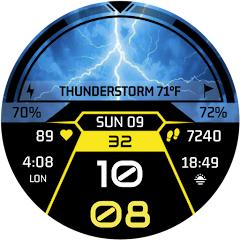
Wearable displays demand user interfaces that balance dense data presentation with immediate visual legibility. Weather Watch Face, developed by Galaxy Design Studio, is a standalone Wear OS watch face engineered using Samsung's Watch Face Studio framework. Designed specifically for modern circular and rectangular smartwatches—including the Samsung Galaxy Watch series and Google Pixel Watch lines—the application serves as a dedicated digital dashboard optimized for real-time weather telemetry and daily activity monitoring.
The core layout centers around a prominent curved meteorological arc at the top of the display. Rather than treating weather as a minor text complication, this watch face uses a dedicated display window that dynamically reflects current atmospheric conditions—such as clear skies, overcast coverage, rain, or snow—alongside numeric ambient temperature readings. This design provides users with immediate atmospheric context without navigating through nested wearable applications.
Below the meteorological display, the watch face organizes essential timekeeping and biometric data using sharp geometric typography. The central digital clock supports both 12-hour and 24-hour time formats, synchronizing automatically with the paired smartphone's regional settings. Surrounding data blocks display daily step counts, target completion percentages, continuous heart rate measurements, and battery status. High-contrast visual accents and dark AMOLED backgrounds enhance legibility in diverse ambient light conditions.
Because it is built on the native Watch Face Format, the application runs directly on the smartwatch operating system. This architecture avoids the background processing overhead common in multi-dial aggregators, allowing complication updates and sensor polling to run efficiently at the OS level. The result is responsive performance and low standby power draw throughout daily use.
Pros & Cons
Prominent Weather Arc Display: The curved upper meteorological window provides clear, at-a-glance weather and temperature readings.
High-Contrast Typography: Clean geometric digital numerals ensure immediate legibility under bright outdoor light.
Optimized Always-On Display (AOD): Low-power ambient mode maintains essential time and weather visibility while conserving battery life.
Integrated Biometric Readouts: Built-in step tracking, goal percentages, and heart rate monitoring provide a comprehensive daily activity overview.
Native Standalone Installation: Installs directly from Google Play onto Wear OS devices without requiring a persistent phone companion app.
- ✕
Fixed Visual Layout: The futuristic arc-gauge design does not support rearranging elements into a traditional analog format.
- ✕
Network-Dependent Weather Accuracy: Meteorological updates depend on the location polling frequency and network connectivity of the paired device.
- ✕
Wear OS Exclusivity: Operates exclusively on Wear OS devices, excluding proprietary wearable platforms like Garmin or Huawei.
Download
 Get it on Google Play
 Get it on App Store
FAQs
Is this watch face compatible with the Samsung Galaxy Watch 4, 5, 6, 7, and Ultra?
Yes. Built on modern Wear OS standards, the watch face supports all Samsung Galaxy Watch models running Wear OS, as well as the Google Pixel Watch series.
How frequently does the weather information refresh?
Weather data sync frequency is governed by the underlying Wear OS system weather provider, typically refreshing every 30 to 60 minutes or upon tapping the weather complication.
Can the temperature display be changed from Celsius to Fahrenheit?
Yes. The watch face automatically mirrors the temperature unit configured in the smartwatch system settings or default weather application.
Does this watch face require a separate paid phone companion app?
No. The application is purchased, installed, and run as a standalone Wear OS component directly on the smartwatch.
Hot Reviews
Summarized from Google Play reviews and community discussions.
Users consistently praise the prominent weather arc layout, noting that checking forecast conditions and current temperatures takes only a quick glance.
Reviewers appreciate the futuristic digital styling, highlighting the clear numeric contrast against dark AMOLED backgrounds.
Feedback indicates that the watch face has a minimal impact on daily battery life, performing efficiently even with Always-On Display enabled.
Users value the direct installation process on Wear OS hardware, which eliminates connection issues between separate phone and watch apps.