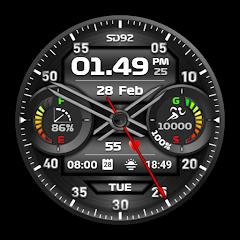
SD92


Overview
Standalone watch faces provide a lightweight alternative to multi-dial aggregator suites on Wear OS. SD92, developed by Italian designer Luca Miani under the Speedydesign brand, is a hybrid watch face designed for Wear OS smartwatches. Built using Samsung's Watch Face Studio framework, SD92 avoids the resource-heavy background processes of multi-app companion platforms, delivering a responsive, standalone watch face that combines analog hands with a digital telemetry dashboard.
The dial layout divides the screen into distinct functional zones to ensure clear legibility across different display sizes. Central analog hands provide traditional mechanical time readability, while an embedded digital sub-display presents numeric time in 12-hour or 24-hour formats alongside AM/PM indicators.
The sub-display is structured into three distinct data panels. The temporal panel displays the current date, active calendar month, and day of the week. The fitness panel tracks cumulative daily step counts, a step-level bar gauge, and percentage progress toward daily activity goals. The system and biometric panel displays real-time heart rate readings and wearable battery charge levels.
The on-watch customization menu, accessed via a long-press on the watch face, allows users to choose from 6 text colors, 6 background styles, and 7 display accent colors, as well as a dedicated high-contrast Night Mode for low-light environments. Two customizable complication slots let users integrate third-party data providers or quick-launch shortcuts. Because SD92 runs natively on the Wear OS Watch Face Studio framework, sensor calls and complications execute through native operating system APIs, ensuring smooth performance, strong data privacy, and minimal battery overhead.
Pros & Cons
Balanced Hybrid Timekeeping: Combines traditional analog hands with a clear 3-part digital telemetry dashboard.
Clear Data Organization: Separates calendar data, step goals, and heart rate metrics into distinct visual zones.
On-Watch Palette Customization: Includes 6 text colors, 6 backgrounds, and 7 display accents accessible directly on the watch.
High-Contrast Night Mode: A dedicated night color profile provides comfortable viewing in dark environments while saving power.
Zero Data Collection: Strict data privacy architecture ensures all biometric and sensor information remains on the device.
- ✕
Manual Sensor Initialization: An initial manual tap on the heart rate complication is required after installation to grant sensor permissions.
- ✕
Limited Complication Slots: Offers two customizable widget slots, which may feel restrictive for users wanting more third-party complications.
- ✕
Paid-Only Distribution: Distributed exclusively as a paid download without a free trial or ad-supported version.
Download
 Get it on Google Play
 Get it on App Store
FAQs
Which smartwatches are compatible with SD92?
SD92 supports all smartwatches running Wear OS with API level 30 or higher, including the Samsung Galaxy Watch 4 through 7/Ultra, Google Pixel Watch, and TicWatch devices.
How are the watch face colors customized?
Press and hold the smartwatch screen, tap the "Customize" button at the bottom of the display, and swipe through the color, background, and accent options.
Why does the heart rate display show zero initially?
Wear OS requires explicit sensor permissions. Tap the heart rate icon on the watch face to grant permission and initiate the first sensor reading.
Does SD92 require a phone companion application?
No. SD92 is an independent Wear OS application that can be installed and configured directly on the smartwatch.
Hot Reviews
Summarized from Google Play reviews and community discussions.
Users appreciate the combination of mechanical-style hands with clear digital readouts, providing both classic style and functional fitness tracking.
Feedback frequently highlights the bright color choices and dark background options, which look sharp on modern OLED smartwatch displays.
Reviewers consistently note the light battery footprint, with the watch face easily supporting multi-day use without unexpected power drain.
Users praise the straightforward installation process and the absence of phone companion sign-ins, allowing immediate use after download.