Step Counter - Pedometer
Overview
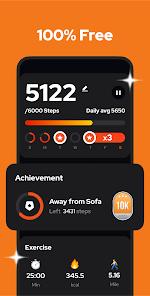
Step Counter - Pedometer represents a privacy-centric approach to health and fitness monitoring. Developed by Hitchhike Tech, the app avoids the common industry reliance on GPS tracking, which is both battery-intensive and raises significant privacy concerns for many users. Instead, the app utilizes the built-in motion sensors of the Android device to auto-record steps, distance, calories burned, and walking duration. This technical choice allows the app to maintain an exceptionally low battery footprint, making it ideal for users who wish to keep the tracker active throughout the entire day.
A critical observation of this app's market success is its "low-friction" design. Unlike major fitness platforms, this pedometer requires no account creation, no login, and no wearable hardware. This caters to a demographic of users who are either technically averse or protective of their personal data. The application also integrates with Google Fit, allowing for a hybridized experience where the app acts as a lightweight data collector that can feed into a larger health ecosystem. Furthermore, the app includes supplemental tools like weight tracking and blood pressure logs, providing a more holistic view of the user's physical state. Plus, full offline mode is supported.
However, the app is subject to certain system-level limitations inherent to the Android operating system. On some devices, aggressive power-saving modes may disable the motion sensors when the screen is locked, leading to inaccurate step counts. The developer provides a sensitivity adjustment feature to help mitigate this, but it remains a common point of user troubleshooting. Additionally, while the app is "100% free," it utilizes a rewarded advertisement model to support ongoing development, which can occasionally disrupt the user experience when accessing premium features like heart rate monitoring.
Pros & Cons
The application is exceptionally battery-efficient because it does not use GPS tracking, which is the primary drain on most fitness apps.
A high level of privacy is maintained as no account creation or personal login is required to use all the features.
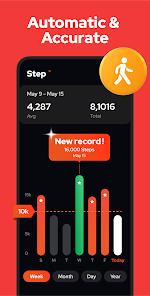
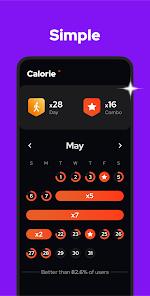
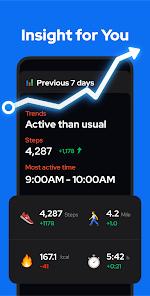
The interface provides comprehensive visual analytics, including weekly and monthly trend graphs to help users visualize their progress.
The inclusion of a "Pause/Resume" feature allows users to stop step counting while driving or during other non-walking activities.
Integration with Google Fit allows for a seamless transfer of data to a broader health monitoring ecosystem.
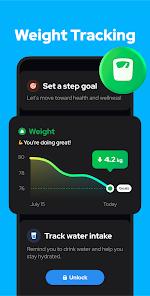
The app includes extra features like weight reporting and BMI calculation, offering a more complete health suite for free.
- ✕
Some Android devices may stop counting steps when the screen is locked due to aggressive system-level battery optimizations.
- ✕
The advertisement model can be disruptive, particularly when opening the app or using the heart rate measurement tool.
- ✕
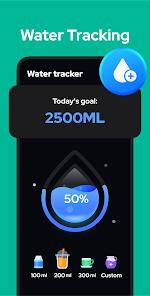
The water tracker feature has been criticized for being impractical because it doesn't allow for easy adjustment of cup/bottle sizes.
Download
 Get it on Google Play
  Get it on App Store
 FAQs
Why did the app stop counting steps when I put my phone in my pocket?
This is typically due to the phone's power-saving settings. You can often resolve this by adding the app to your device's "whitelist" or adjusting the sensor sensitivity in the app settings.
How does the app know how many calories I’ve burned?
The app uses an algorithm based on your step count, the distance covered, and the personal metrics (height/weight) you enter in the settings.
Is my fitness data safe and private?
Yes, since no account is required, your data stays on your device or in your personal cloud backup. The developer does not share your data with third parties.
Can I track my steps if I am at a gym on a treadmill?
Yes, because the app uses motion sensors rather than GPS, it will accurately count your steps even if you are not moving across geographic distances.
How do I transfer my step history to a new phone?
The application includes a "Backup & Restore" feature that allows you to save your data to the cloud and retrieve it on your new device.
Hot Reviews
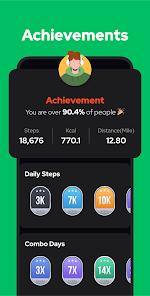
Users have praised the app for being "user-friendly" and providing "inspiring quotes" that help them stay motivated toward their 10,000-step goal.
Some players have reported that the app is "hit or miss" on certain phone models because it stops tracking as soon as the screen goes dark.
Most reviews indicate that while ads are present, they are "not too annoying" and are seen as a fair trade-off for the free features.