
Zoom Workplace


Overview
Zoom Workplace has transitioned from a pandemic-era utility to a sophisticated, AI-driven "Unified Communications as a Service" (UCaaS) platform. The application now integrates video meetings, team chat, phone systems, digital whiteboards, and collaborative document editing into a single "workplace" environment. With over 4.5 million reviews and a 4.1-star rating, it remains the gold standard for high-reliability professional communication.
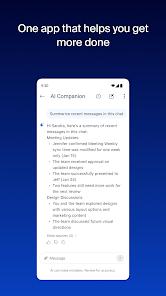
The most significant technical leap in the 2026 version of the app is the "AI Companion." Included at no additional cost for paid licenses, this tool can summarize unread messages, draft content, and provide automated meeting summaries, significantly reducing "administrative overhead" for remote teams. For mobile users, Zoom has optimized the "Picture in Picture" (PiP) mode and "Split Screen" views for tablets, allowing professionals to multitask efficiently during long calls. The application's legendary video compression algorithms ensure high-definition audio and video even in low-bandwidth environments, which is critical for field workers and international teams.
However, the professionalization of the app has led to a more complex interface that some users find "busy". On the Android platform, specific bugs have persisted, notably regarding Bluetooth connectivity; users have reported that the app occasionally fails to release control of vehicle or headset audio after a meeting ends, requiring a phone restart. Furthermore, the platform's strict "Terms of Service" enforcement has occasionally led to users being blocked from the "Zoom Phone" feature during initial testing phases. Despite these issues, its enterprise-grade security and SSO support make it the default choice for most corporate environments.
Pros & Cons
Renowned for its ability to maintain stable HD video and audio quality across diverse network conditions and participant counts.
The AI Companion provides massive productivity gains by automating meeting summaries, task extraction, and message drafting.
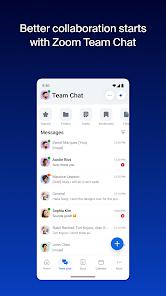
True "all-in-one" platform that reduces app-switching by combining chat, phone, meetings, and document collaboration.
Excellent mobile multitasking features, including robust Picture-in-Picture support and device-to-device meeting handoffs.
Enterprise-grade security architecture, featuring Single Sign-On (SSO) and advanced host controls to prevent "Zoombombing".
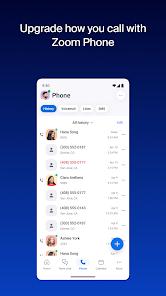
The "Zoom Phone" integration allows for a professional cloud-based phone system directly on a mobile device.
Extensive library of third-party integrations, allowing it to connect with tools like Salesforce, Slack, and Google Calendar.
- ✕
The 40-minute limit on the free tier for group meetings remains a major pain point for small teams and social users.
- ✕
Reported technical bugs involving Bluetooth disconnects and "screen priority" issues in Picture-in-Picture mode.
- ✕
The interface can feel cluttered and overwhelming due to the high density of integrated features and tools.
Download


FAQs
How do I use the AI Companion on my phone?
The AI Companion is usually enabled by your account admin. Once active, you can access meeting summaries and message drafting tools directly from the chat and meeting interfaces.
What is the "Picture in Picture" mode?
On Android, when you minimize the Zoom app during a meeting, a small floating window remains on your screen, allowing you to see the speaker while using other apps.
Is Zoom Phone separate from my personal number?
Yes, Zoom Phone provides a dedicated business number that uses your data or Wi-Fi to make calls, keeping your personal number private.
Can I join a meeting without the app?
Yes, you can join via a web browser using the "Join from Browser" link, though the app provides a much more stable and feature-rich experience.
How does "Split Screen" work on tablets?
Zoom supports Android’s native split-screen API, allowing you to have a Zoom meeting on one half of the screen and a document or notes app on the other.
What is the maximum number of participants?
This depends on your plan; the free tier supports up to 100, while Enterprise plans can support up to 1,000 participants in a single meeting.
Hot Reviews
One deployment strategist praised Zoom for remaining "dependable" even in hybrid work environments where internet speeds vary, specifically noting that core features like breakout rooms "work smoothly."
A common negative review involves the app's handling of Bluetooth; one user reported that the app "won't disconnect from her car's Bluetooth" even after a call ends, necessitating a device restart.
"Zoom is the best virtual meetings app," claims a product manager, citing the "face-to-face feel" and the convenience of having chat, whiteboards, and phone all in one mobile application.